The Phase Scheduling Diagram
A phase scheduling diagram describes sequencing of the different phases of a method.
 A method represents a series of actions carried out to achieve a goal. A method is described by a series of phases.A phase is an operational activity that participates in production of the deliverables of the approach. It can be an activity related to production, verification, delivery, etc.
Accessing the Phase Scheduling Diagram
To access the diagram that describes a method:
2. Expand the "Methods" folder.
3. Right-click the "Six Sigma" method for example, and in its pop-up menu, select Phase Scheduling Diagram.
The phase scheduling diagram opens.
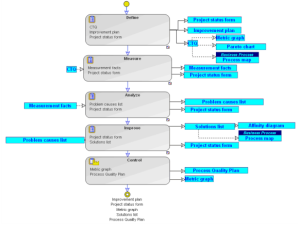
"Six Sigma" Method Phase Scheduling Diagram
It presents the sequencing order of phases and the deliverables expected at input and output of each of these phases.
In the example above, the first phase of the method is "Define" and the output deliverables of this phase are "Project Status Form", "Improvement Plan" and "CTQ".
 A phase sequencing diagram can be represented in standard notation or in BPMN notation, depending on the Method Graphical Notation defined in the Characteristics tab/page of a method.
 Phase Properties
A phase is an operational activity that participates in production of the deliverables of the approach. It can be an activity related to production, verification, delivery, etc.To access phase properties:
1. In its properties dialog box, click the Characteristics tab/page.
The following appears:
• the Phase Type (for example, "Production"),
• the optional character of the phase,
• the Implementing Method list, used to provide the project manager, at project creation, with a list of implementation methods for this phase.
You can for example consult the list of methods implemented in the "Business Process Mapping" phase. For more details on phase splitting, see Splitting phases.2. Select the Details tab/page to determine the list of sub-phases making up the phase.
For more details on phase splitting, see Splitting phases.3. Select the Resources tab/page to determine the list of resources required to execute the phase.
For more details, see Phase Resource.4. Select the Deliverables tab/page to determine the list of deliverables used and produced by the phase.
For more details, see Phase Deliverable.Phase Resource
In HOPEX, phase resources can be of different types: "Skill", "Software", "Documentation" or "Training", for example.
To specify phase resource type:
1. Open the properties dialog box of the phase and select the Resources tab/page.
The list of resources required for execution of the phase is displayed.
2. Right-click a resource and open its properties dialog box.
3. Select the Characteristics tab/page and select the Resource Type.
4. Click Finish.
Phase Deliverable
A deliverable is an element produced, modified or used by a phase or method (example:A deliverable enables specification of the list of elements expected at input or output of a phase. In HOPEX, these deliverables can be represented by objects of different types:
• a Report Template
• a Report Template (MS Word)
• a Book
• a Diagram
• an External Reference
• a Business Document
The list of deliverables expected at phase input or output is accessed from the Deliverables tab of the phase properties dialog box. For more details on phase properties, see Phase Properties.