Describing the structure and services of an application
Application structure diagram
 An application structure diagram graphically shows first level components of an application, the access points (service point and request point) and the connections between components.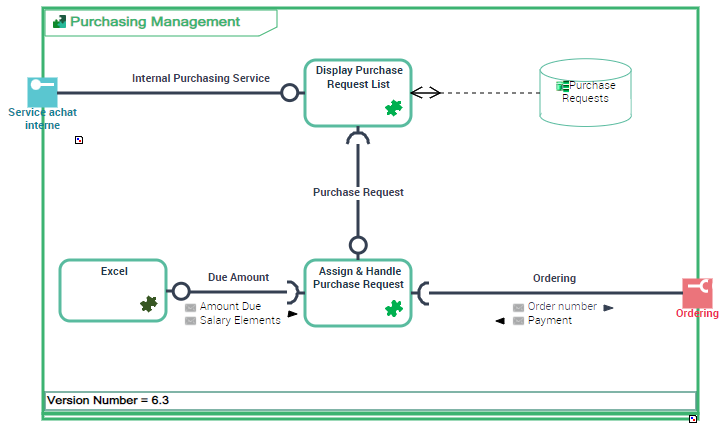
The “Purchase Request Management” application uses two IT Services: “Display purchase request list” and “Assign and handle purchase request”. The “Assign and handle purchase request” IT service invokes Excel micro-service.
Creating an Application Structure Diagram
To create an Application Structure Diagram, for example:
1. Select the Application that interests you and click Create Diagram.
2. In the dialog box, select Application Structure Diagram.
The diagram opens in the edit area. You are now in the HOPEX graphic editor. The frame of the Application described appears in the diagram.
The components of an Application Structure Diagram
An Application Structure Diagram includes:
• IT services which represent the IT services used and deployed with the application.
In the example, it relates to “Display purchase request list” and “Assign and handle purchase request” services.
An IT service is a software component of an application, that can't be deployed alone and that realizes a sub-set of the functionalities of this application either for end users of this application or inside the application (or another application). This includes batch programs.• micro-services which represent the services used independently of the application.
In the example, it relates to the Excel application.
A micro-service is a software component that can be deployed autonomously, but which does not directly provide an end user service. It can interact with other application services, applications or application systems. This is a deployable software component that uses software technologies. For example: an authentication service, a PDF file printing service.• request and service points
 For more details, see Describing Service and Request Points.
• interactions between components.
An interaction represents a contract established in a specific context between autonomous entities that are internal or external to an enterprise. These entities can be enterprise org-units, applications, activities or processes, as well as external org-units. The content of this contract is described by an exchange contract.• physical data stores used by the application.
For more details, see Managing Data.Adding an application service to an application structure diagram
To describe that an application uses an application service, go to:
1. In the object toolbar of the application structure diagram, select Application Service and click in the frame of the application described.
An addition dialog box asks you to select the existing IT Service Name.
2. Select an existing IT service.
3. Click OK.
The application service appears in the diagram.