Concept Components
A concept can be connected to another concept to characterize it.
For example, the "Work" concept is connected to the "Person" concept to characterize the "Author" of a work.
This relationship is described by a Concept Component, which can be associated with a term.
 A concept component enables representation of a dependency relationship between two concepts. This relationship is directional.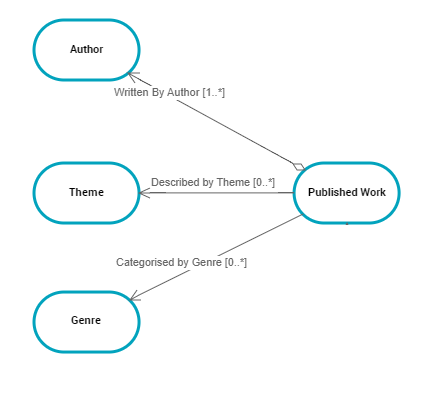
Accessing Concept Components
To access concept components
1. Open the properties of a concept.
2. Click the Characteristics page.
3. Expand the Components section.
The list of components owned appears.
 You can also view the list of components of a concept in its concept structure diagram. For more details, see Concept structure diagram.
Creating a Concept Component from a Diagram
The procedure for creating the "Author" concept component between "Work" and "Person" concepts is described as an example.
To create a concept component between two concepts of a concept domain:
1. In the concept diagram associated with the concept domain, click on the concept that holds the link, for example "Work".
A bar containing the objects you can insert appears.
2. Click on the icon that represents the Concept component.
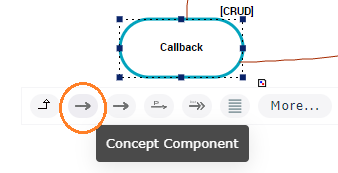
3. Slide the cursor to the target concept, for example "Person".
4. When the cursor becomes a double chain link, release the mouse button.
The Concept Component creation wizard opens.
5. Enter a Name, for example "Author".
6. Given that the term "Author" must be created, select the "Creation with term" check box.
In the section Term appears in the creation creation dialog box.
A term is a word or word group, that is used for a specific meaning in a specific context.7. In the Definition Text field, enter the text of the Concept Component definition and click OK.
The concept component appears in the graph.
A new term with the same name as the concept component is also created.You can also create a concept component in a concept structure diagram. In this case, you must specify the target concept in the concept component creation wizard.
For more details, see Concept structure diagram.Describing Concept Power Components
Just as a Concept can be characterized by a link to another concept, a concept can also be characterized by a link to a Concept Type.
A concept type enables classification of concepts. Relationships between concept types are represented by concept type components.For example, each member "Person" could be characterized by a "Loan Type".
For more details, see Concept Type.The relationship between a Concept and a Concept Type is described by a Concept Power Component.
A concept power component enables connection of a concept to concept type to characterize a property of the concept.To create a Concept Power Component between a concept and a concept type in a concept domain diagram:
1. In the insert toolbar, click the Link button.
2. Click the concept that owns the link.
For example, "Person"
3. Click the target concept type.
For example, "Loan Type".
The Concept Power Component creation wizard opens.
4. Specify the Local Name.
5. If no term is to be created, select the "Creation without term" check box.
6. Click OK.
The Concept Power Component appears in the diagram.
Describing a Computed Concept Component