Customizing the Components of a Method
A method is described by a series of phases. These phases are the operational activities that are performed in order to produce the different deliverables of the method.
Phases can be customized.
Phase properties
From the properties dialog box of a phase, you can specify important information on project implementation.
To access the properties of a phase:
1. In the Methodology or TOGAF 9 navigation window, expand a method.
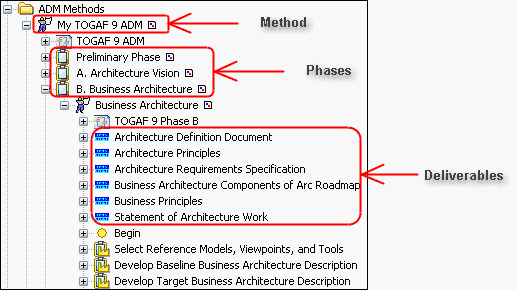
Example of a method
2. Right-click the desired phase and select Properties.
3. In the properties dialog box that opens, select the Characteristics tab.
In this tab you can indicate:
• The Phase Type (for example, "Production"), as well as the Optional phase.
• An Implementing Method list, which is the list of implementation methods for this phase suggested to the project manager during project createion.
 You can, for example, view the list of methods implemented in the "Business Process Mapping" phase. For more details on phase splitting, see Specifying phase composition.
4. Select the Details tab to specify the list of sub-phases that make up the phase.
For more details on phase splitting, see Specifying phase composition.5. Select the Resources tab to specify the list of resources required to execute the phase.
6. Select the Deliverables tab to specify the list of deliverables used and produced in the phase.
Phase resource type
In HOPEX, phase resources can be of different types: "Skill", "Software", "Documentation" or "Training", for example.
To specify a phase resource type:
1. Open the properties dialog box of the phase and select the Resources tab.
The list of resources required for executing the phase is displayed.
2. Right-click a resource and open its properties dialog box.
3. Select the Characteristics tab and select the Resource Type.
4. Click OK.
Deliverable properties
A deliverable is an element that is expected at the input or output of a phase. In HOPEX, these deliverables can be supported by different types of tools: Analysis Template, Document Template, Diagram or External Reference.
To determine the list of components of a deliverable:
1. Right-click the deliverable and select Properties.
2. In the properties dialog box, select the Templates tab to view the list of elements associated with the deliverable.
The list of deliverables expected at phase input or output is accessed from the Deliverables tab of the phase properties dialog box. For more details on phase properties, see Phase properties.