Consulting the Key Indicator Dashboard
To consult your key indicator dashboard:
1. In the navigation menu, select Library > Indicators.
2. Open the property page of your indicator.
The dashboard gives you an overview of the computed characteristics of your indicator.
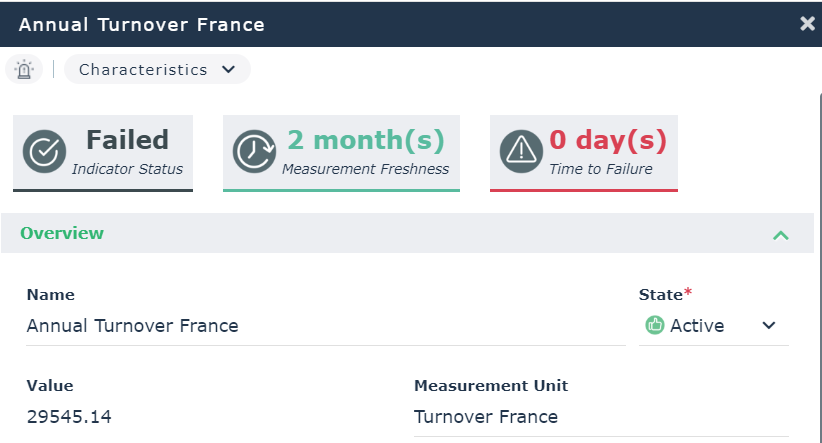
Indicator Status
Default statuses
The following statuses are available by default:
• Unknown
• Operational
• Warning
• Unsatisfactory
• Critical
• Failed
Their meaning depends on the indicator category and interpretation logics behind it.
 The indicator status is to be distinguished from the indicator state (which indicates whether the indicator is active or not).
The indicator status enables to issue a warning when necessary. For more information, see Defining Measurement Frequency and Notifications.
Information about indicator status computation
The indicator status is computed based on:
• the indicator latest values
• the aggregation period
 An aggregation period is the period over which the indicator values are aggregated to compute the current indicator value and status.
• the aggregation method.
An aggregation method is the mathematical operation carried out over the indicator aggregated values in order to compute the indicator current value and status.The status computation is triggered when:
• a new value is added
• an existing value is deleted
• key indicator thresholds are edited
• the indicator state (active or inactive) has been modified
Time To Failure
Time to Failure is the number of estimated days before the indicator turns to "Failed" status.
A linear interpolation of past values is performed to compute Time To Failure.
You must specify the number of past values taken into account to compute Time to Failure. For more information, see Consulting the Key Indicator Dashboard.
Value | Details |
|---|---|
Unknown | Not enough data available (at least 2 aggregated values should be available) |
Unforeseen | The indicator values evolve in a way which makes it impossible to reach/predict the Failed status. 9999 is displayed in the Time to Failure column of the list of indicators. |
0 day(s) | The indicator status is "Failed" already. |
Indicator Freshness
Indicator freshness is the time elapsed (number of days) since the last indicator value entered.
It is rounded to the closest integer.
Indicator Value
In the property page of the indicator, you can also find the Value of the indicator.
The indicator value consists of the last aggregated measurement of the indicator.
If no aggregation period or method have been defined, it consists of the last measurement of the indicator.See also: Entering Periodic Key Indicator Values.