More Key Indicator Characteristics
After having created your indicator, you can modify some of his characteristics and describe it in a more detailed manner.
 You cannot change the KRI category, aggregation period and aggregation method after the KRI has been created.
Editing Key Indicator Parameters
Once the indicator has been created, you can no longer edit the indicator category, aggregation period or method. You can however edit a few parameters.
To edit parameters:
1. In the Characteristics indicator property page, expand the Advanced section.
2. Click Edit Parameters.
In the window that opens, you can edit:
• the Lower Threshold and Higher Threshold.
• the Number of values used to compute Time to Failure
 Time to Failure is the number of estimated days before the indicator turns to "Failed" status.The Number of values used to compute time to failure is the number of past values that should be taken into account. It is 12 by default. The higher the better but this could impact performance negatively. It is therefore important to find the right balance.
Note that when you edit these parameters, Status and Time to Failure are automatically updated.
Defining a Measurement Unit to be Displayed in Reports
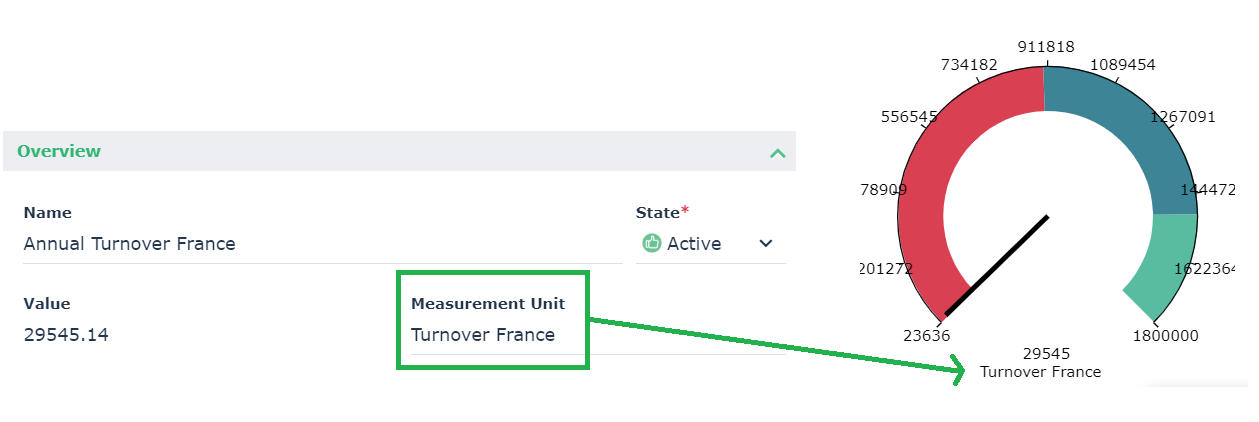
In the property page of a key indicator, the Measurement Unit field represents what the indicator is monitoring. The contents of the field is reused as a label for the Y axis in the indicator graphs.
For more information on graphs and reports, see Viewing the Indicator Graph.
Activating / Deactivating a Key Indicator
A key indicator is activated by default when it is created. You may want to deactivate it if it reaches its end of life, if no more measurements are to be made. You can deactivate a key indicator by modifying its state.
To deactivate a key indicator:
1. Open the key indicator property page.
2. In the State field, select "Inactive".
If you set the state to "Inactive":
• The value and status of the key indicator is computed one last time
• It is no longer possible to enter new values
• All current notifications are deactivated
To be able to enter new values again and/or edit the properties of the key indicator, set the State to "Active".The state of a key indicator should be distinguished from its status.Specifying the Indicator Scope
To specify the scope of the indicator:
 In the property page of the indicator, select the Characteristics page and expand the Scope section.
Here you can specify the associated:
• entities
An entity can be internal or external to the enterprise: an entity represents an organizational element of enterprise structure such as a management, department, or job function. It is defined at a level depending on the degree of detail to be provided on the organization (see org-unit type). Example: financial management, sales management, marketing department, account manager. An external entity represents an organization that exchanges flows with the enterprise, Example: customer, supplier, government office.• business processes
A business process represents a system that offers products or services to an internal or external client of the company or organization. At the higher levels, a business process represents a structure and a categorization of the business. It can be broken down into other processes. The link with organizational processes will describe the real implementation of the business process in the organization. A business process can also be detailed by a functional view.• organizational processes
An organizational process describes how to implement all or part of the process required to make a product or handle a flow.• applications
To remove an indicator from a given entity:
1. In the property page of the indicator, expand the Scope section then select th Entity tab.
2. Remove the appropriate entity.
Specifying Action Plans
To define action plans on a key indicator:
1. In the properties of the key indicator, select the Remediation page.
2. Connect an existing action plan or create one as appropriate.
An action plan comprises a series of actions, its objective being to reduce risks and events that have a negative impact on company activities.For more information on action plans, see the corresponding information in the Common Features section of this Online help.