Managing Instant Reports
You can generate instant reports, which give access to a more detailed analysis of a list of objects.
Instant reports offer statistical graphic analysis of the data of analyzed objects. They offer a rapid view of trends, or easy comparison of objects according to certain characteristics.
Introduction to Instant Reports
When a list includes attributes enabling automatic report calculation, this functionality is proposed.
You can launch instant reports from:
• a list of objects

• an object
• a Report DataSet
By default the report is launched on all of the objects in the list (no objects selected). To restrict the analysis to specific objects, select the objects concerned before launching the report.
You can:
• choose the object characteristics to be represented
E.g.: the cost of objects.
• define the type of chart in which to display the data
E.g.: quantitative, table, time.
• (table type instant report from a Report DataSet), add filters to each input data item
You can save an instant report:
• in your reports
• in your dashboard
The report is recorded as a Widget and available for other users.
• in your home page (as a tile)
You can customize your instant report.
Grouping characteristics of objects concerned
Characteristics of grouping can relate not only to attributes of the selected object, but also to attributes of an object that is connected to it by a multiplicity = 1. The connected object attributes, which may grouped, are presented as follows: “Connected object: connected object attribute".
Example: the Provider object appears in the list of characteristics of the Technology object, with the different attributes to which grouping can relate.

Attributes available in instant reports
Object attributes taken into account in instant reports are:
• those that naturally enable grouping of objects
E.g.: tabulated value attributes (including booleans).
• those that position the object in time:
E.g.: to create a Gantt diagram: life cycle
Unless otherwise specified, these eligible attributes are proposed by default to constitute a new report.
Other attributes can constitute grouping criteria, but require a declaration at their metamodel definition level.
The Instant Reports attribute on MetaAttributes/_LegAttributes enables specification of attribute behavior related to reports:
• Graphable: the attribute participates in the instant reports mechanism
• Non Graphable: the attribute is excluded from the instant reports mechanism
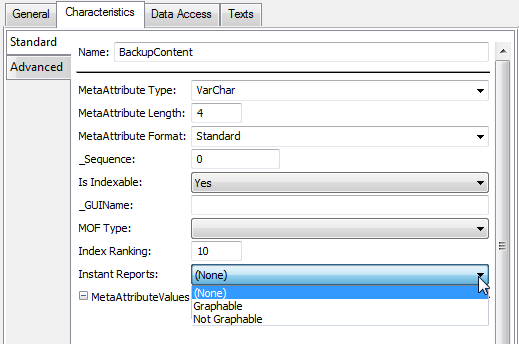
By default, tabulated value attributes and _legattributes are included in the mechanism.
This attribute is also available on links.