Consolidating results and assessments
Consolidation rules
Each answer to a question is associated with a percentage calculated using:
• The value defined in the Answer Value field of the chosen answer,
• The maximum value of possible answers,
• The minimum value of possible answers.
 For more details on the values associated with answers, see Defining Questions for the Assessment of a Customer Journey.
In this way, the value of the answer that corresponds to the best assessment equals 100% and the value of the answer that corresponds the least equals 1%.
For example, if the best answer to the question “Rapidity of the web application” is “Satisfactory” associated with a value equal to 11, the “Very slow” assessment is associated with a value equal to 1 and the intermediate assessment "Quite slow" is associated with 3, then the value of the "Quite slow" assessment equals 20%.
Overview
The assessment results presented in the diagrams, the lists and properties pages are in general the values of the latest assessment.
Only the reports present average results. The calculation rules for averages are always the same irrespective of the object:
 The average value of the assessments of an object is the average of the assessment values of the object for a given period.
For example, if for the question "Rapidity of web application" the first answer was "Satisfactory" (value 100%) and a second answer was "Too slow" (value 1%), then the average value of assessments equals 50%.
Value of the latest assessment of a question
The value of the latest assessment of a question is used to calculate the values of the last assessment of the steps for which the answers were given.
The value of the latest assessment of a question is the value of the percentage calculated for the answer during the latest assessment.
In the example of the question concerning "Rapidity of the web application", if the response "Satisfactory" was chosen during the latest assessment, then the value of the latest assessment of this question is 100%.
Value of the latest assessment of a step
Each of the questions associated with a channel are asked for all steps that use the channel.
For example, the web application channel is used for all the steps in the "Holiday reservation" phase.
The questions on the "Application web" channel can deal with its "Rapidity" and its "Conviviality"
The value of the latest assessment of a step is used to calculate the assessment values of a channel if answers were given.
The value of the last assessment of a step is the average of the values of the latest assessment of each of the questions relating to the step.
For example, the value of the "Proceed to payment" step is the average calculated using the value of the latest assessment given to the "Rapidity" and to "Conviviality".
Value of the latest assessment of a channel
The value of the latest assessment of a channel is the average of the values of the latest assessment of each of the steps connected to the channel.
Value of the latest assessment of a customer journey
The value of the latest assessment of a customer journey is used to calculate the assessment values of a customer journey group and a persona.
The value of the latest assessment of a customer journey is the average of the values of the latest assessment of each of the steps in the customer journey.
Value of the latest assessment of a customer journey group
The value of the latest assessment of a customer journey group is the average of the values of the latest assessment of the customer journey of the group.
Value of the latest assessment of a Persona
The value of the latest assessment of a persona is used to calculate the assessment values of a persona group.
The value of the latest assessment of a persona is the average of the values of the latest assessment of the customer journeys connected to the persona for a given period of time.
Value of the latest assessment of a Persona Group
The value of the latest assessment of a persona group is the average of the values of the latest assessment of the group persona.
Consolidated results
The consolidated results on the customer journey are presented in:
• Diagrams,
For more details, see Representation of consolidated results in the diagrams.• Lists,
For more details, see Representation of consolidated results in the lists.• Dedicated reports.
For more details, see The reports available on a customer journey.Representation of consolidated results in the diagrams
After assessment of a customer journey, the shape of the steps in the customer journey diagram is modified to present the results of the latest assessment of steps.
For more details on calculating the value of the assessment, see Value of the latest assessment of a step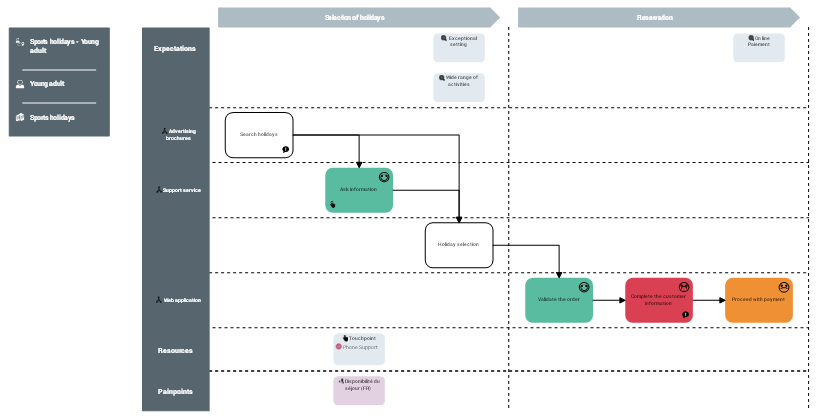
Mapping a journey after assessment
Journey step | Comment |
|---|---|
 | Customer satisfaction very low |
 | Customer satisfaction low |
 | Customer satisfaction neutral |
 | Customer satisfaction high |
 | Customer satisfaction very high |
 | Customer satisfaction not assessed |
Presentation of the shape of steps differs according to the consolidated result of assessments.
Representation of consolidated results in the lists
After assessment of a customer journey, the consolidated results of the latest assessment appears in the lists. For example:
• In the Assessment > Assessed Customer Journeys folder,
• In the properties page for the customer journey in the Assessments tab.
For more details on calculating the value of the assessment, see Value of the latest assessment of a step