Regulation Frameworks
 A regulation framework is a set of directives, compulsory or not, defined by a government in a law, by standard bodies as "best practices" or as an internal policy in an organization.
Accessing the regulation frameworks of the organization
To access the regulation frameworks with the Control and Risk Architect profile:
1. From the Repository paint, select Controls and Risks navigation window, then expand the folder that corresponds to your repository.
The Regulation Frameworks and Control Systems folders appear.
2. Expand the Regulation Frameworks folder.
The list of regulation frameworks for the organization is displayed.
 You can import into your repository libraries containing description of a regulation framework with its associated requirements, risk types, risk factors and control types.
 There can also be regulation frameworks internal to the organization serving as a guide to governance. In this documentation, the terms "Regulation" or "regulation framework" are used to refer to both internal and external regulations.
Create a regulation framework
To create a regulation framework with the Control and Risk Architect profile:
1. From the Repository paint, select Controls and Risks.
2. In the pop-up menu of the "Regulation Frameworks" folder, select New > Regulation Framework.
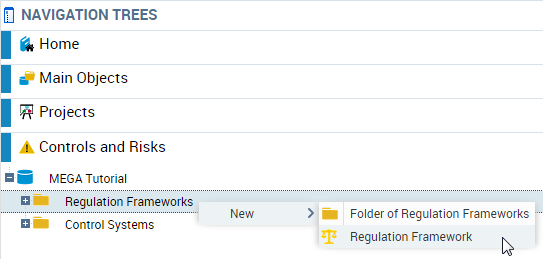 A dialog box asks you to enter the name of the new regulation framework.
3. Having entered the name, click OK.
The new regulation framework appears in the navigator menu tree.
Regulation framework characteristics
To access the general characteristics of a regulation framework:
1. Open the properties dialog box of the regulation framework.
2. Click the Characteristics tab.
The characteristics are as follows:
• The Regulation Code , which is internal,
• Regulation Scope, which can be international, local, a country or group of countries, etc.
• Regulation Date, open-ended text that specifies the year or application period of the regulation
• Application Begin Date of the regulation
• Application End Date of the regulation
• Regulation Status
the Regulation Status appears grayed and cannot be modified since it is managed by the workflow associated with the regulation framework. For more information, see HOPEX Internal Control.• The date of the Last Update of the regulation.
Regulation framework classifications
To access the classifications of a regulation framework:
1. Open the properties dialog box of the regulation framework that interests you and click Classification.
2. You can select a classification from among the following:
• Risk types, see Risk types;
A risk type defines a risk typology standardized within the context of an organization.• Risk factors, see Risk factors;
A risk factor is an element which contributes to the occurrence of a risk or which triggers a risk. Several Risks can originate from a same Risk Factor Examples: the use of a hazardous chemical product, the complexity of an application, the size of a project, the number of involved parties, the use of a new technology, the lack of quality assurance, the lack of rigor in requirements definition…• Control types, see Control Types.
A control type allows the classification of controls implemented in a company in accordance with regulatory or domain specific standards (Cobit, etc.).3. If you select Risk Types, for example, the list of risk types associated with the regulation framework appears.
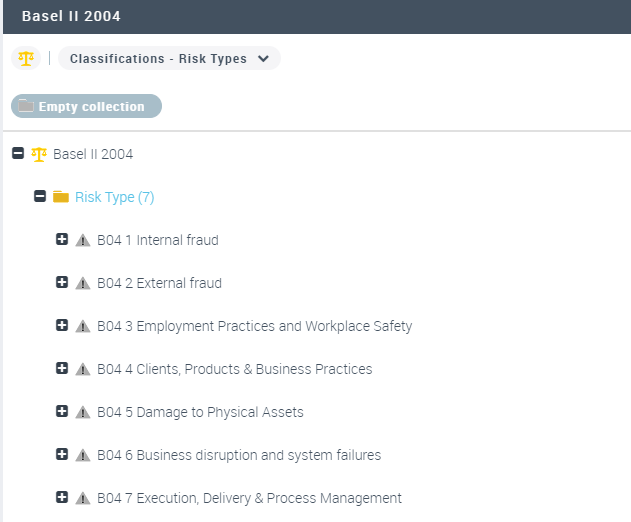
Regulation framework requirements
To access the requirements of a regulation framework:
 Open the properties dialog box of the profile that interests you and click Requirements.A requirement is a need or expectation explicitly expressed, imposed as a constraint to be respected within the context of a project. This project can be a certification project, or an enterprise information system organization or modification project.
Control systems of a regulation framework
A risk and control system is a set of controls that enables the assurance of risk prevention and management, application of internal operating rules, respect of a law or regulation, or achievement of an objective as defined by company strategy.For more details on control systems, see Control Systems.