Risk types
By grouping similar potential events, managers can improve their procedure for identifying opportunities and risks.
Enterprises can also classify potential events to ensure that the efforts deployed for identification are exhaustive. This classification can also contribute to subsequent development of an overview of risks.
 A risk type defines a risk typology standardized within the context of an organization.
A risk type enables risk characterization. For example, a risk type can be regulatory, legal, technical, etc.
Breakdown of risk types will be specific to activities and will depend on the particular business line or activity. Generic risk types can be broken down to a greater or lesser extent into specific risk type levels.
It is important to have a risk type definition framework that is identifiable, measurable and manageable, and to limit the number of levels to assure usable nomenclature.
Validation of nomenclature should ensure that a risk defined in two different entities or activities will have the same definition and the same sense, therefore ensuring system consistency.
In that the system installed should also meet regulatory requirements, it will also be necessary to define a second nomenclature to meet declaration aspects and to enable exchanges with control authorities.
For example, in the banking sector, risk types have been defined in the context of Basel II recommendations. For more details, see http://www.bis.org/bcbs/ HOPEX enables handling of these risk types.
To create your own risk types with the Control and Risk Architect profile:
1. From the Repository paint, select Controls and Risks navigation window, then expand the folder that corresponds to your repository.
The Regulation Frameworks and Control Systems folders appear.
2. Expand the Regulation Frameworks folder.
The list of Risk Types appears.
3. Click on the title bar of the Risk Types folder, select New > Risk Type..
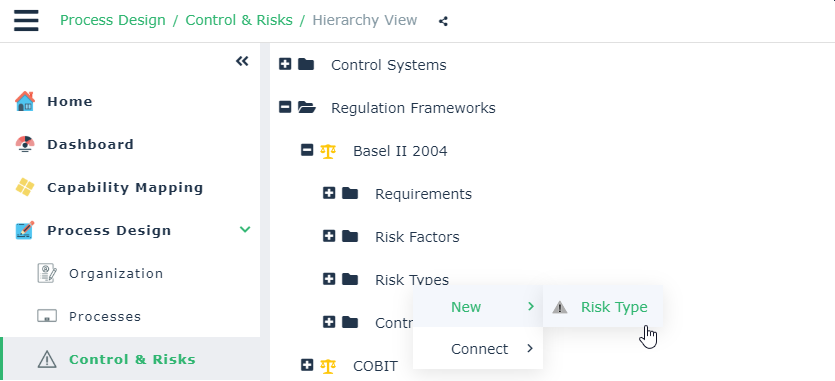
4. Enter the name of the risk type and click OK.
The new risk type appears in the navigator menu tree.
 Similarly, you can create a sub-risk type from a risk type.To create your own risk types with the Risk Manager (simplified) profle in the Risk Library tab, select Risks > Categories > Risk Types.