Control Systems
 A risk and control system is a set of controls that enables the assurance of risk prevention and management, application of internal operating rules, respect of a law or regulation, or achievement of an objective as defined by company strategy.
To access the list of control systems with the Control and Risk Architect profile:
1. From the Repository paint, select Controls and Risks navigation window, then expand the folder that corresponds to your repository.
The Regulation Frameworks and Control Systems folders appear.
2. Expand the Control Systems folder.
The list of control systems defined in the database appears.

With each control system can be associated requirements, risk types, etc.
Creating a control system
To create a control system with the Control and Risk Architect profile:
1. From the Repository paint, select Controls and Risks.
2. In the "Control Systems" folder pop-up menu, select New > Control System.
 A dialog box asks you to enter the name of the new control system.
3. Having entered the name, click OK.
The new control system appears in the navigator menu tree.
Control system characteristics
To access the characteristics of a control system:
1. Open its properties dialog box from its pop-up menu.
2. In the properties dialog box that opens, select the Characteristics tab.
For a control system you can enter:
• The Control System Code
• The Control System Audit Periodicity.
• The Regulation Frameworks to which the control system makes reference.
Control system scope
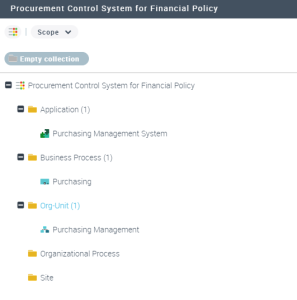
In the Scope tab of the control system properties dialog box, you can indicate the applications, business functions, processes, org-units, sites, etc. concerned by the control system.
Control system requirements
A requirement is a need or expectation explicitly expressed, imposed as a constraint to be respected within the context of a project. This project can be a certification project, or an enterprise information system organization or modification project.With the Control and Risk Architect profile, you can select, from the requirements associated with regulation frameworks to which the control system refers, those relevant to this control system.
To do this:
 In the navigator, copy the requirements of interest and paste these in the "Requirements" folder of the control system.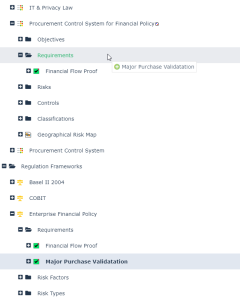
You can also add requirements specific to the particular control system.
To create a requirement with the Control and Risk Architect profle:
1. From the Repository paint, select Controls and Risks.
2. In the "Control Systems" folder pop-up menu, select New > Requirement Pass.
3. 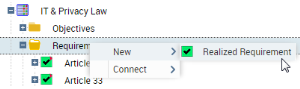 Enter its name and click OK to include this new requirement in the list of control system requirements.
Enter its name and click OK to include this new requirement in the list of control system requirements.Control system objectives
You can find objectives and requirements of the control system in the Objectives and Requirements tab of its properties dialog box.
An objective is a goal that a company/organization wants to achieve, or is the target set by a process or an operation. An objective allows you to highlight the features in a process or operation that require improvement.Classifications
The different classifications (risk factors, risk types, control types) associated with a control system are accessible from the control system dialog box and from the navigator.
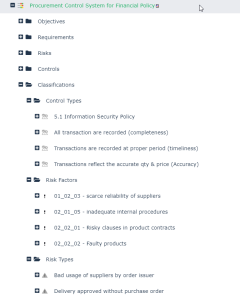
As for requirements, you can select from among the classifications associated with regulation frameworks those that are relevant to this control system.