FAQs
What is the meaning of the actions below?
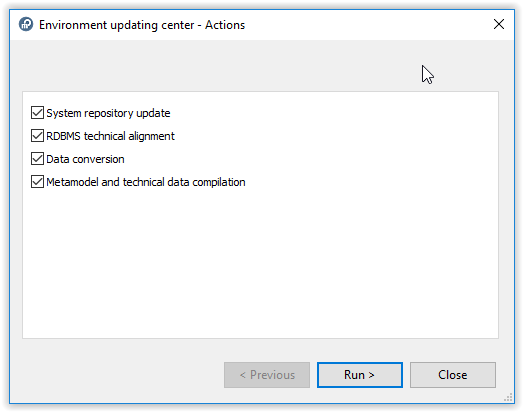
System repository update: update of system repository by import of .MOL files.
RDBMS technical alignment: update of tables at SQL level (RDBMS only).
Data conversion: additional conversion for system repository and data repositories.
Metamodel and technical data compilation: compilation.
How can I get the MSP file of the Corrective Pack?
Procedure:
• Copy the .EXE of the Corrective Pack file in a temporary folder,
ex: C:\tmp\HOPEX_V4.00.01.exe
ex: C:\tmp\HOPEX_V4.00.01.exe
• Open a command prompt window (CMD)
• Run the following command <path of EXE)> /E, Ex: C:\tmp\HOPEX_V4.00.01.exe /E
• The installation wizard is loaded. Click 'Cancel' then 'Yes' and 'Finish' to exit the wizard.
• In the temporary folder, a .MSP file has been created, ex: MEGA HOPEX V4 Patch 501.msp
After CP update the version of GraphQL does not match the version installed with the master!
This is caused by the installation policy in HOPEX V4:
• MSI (HOPEX master) also installs HOPEX GraphQL
With each new master, a version of the HOPEX GraphQL add-on is installed. Yet a more recent version might be available online on HOPEX Store
With each new master, a version of the HOPEX GraphQL add-on is installed. Yet a more recent version might be available online on HOPEX Store
• MSP (HOPEX CP) does not install HOPEX GraphQL and does not update it
How to know the version of HOPEX GraphQL installed?
See control panel
Check version for program 'HOPEX GraphQL API'
How to update HOPEX GraphQL?
Keep Web.config of GraphQL IIS Application to save settings
Uninstall existing version of GraphQL
Download a latest version of GraphQL from HOPEX Store
Install latest version
Update Web.config accordingly
Where to get the last version of HOPEX GraphQL?
See HOPEX Store https://community.mega.com/t5/HOPEX-Store/bd-p/hopex-store
Use another HTML Browser than Chrome as long as a conflict is not fixed
When to update HOPEX GraphQL with latest version?
This can be
• If an error is met in a component using GraphQL (precaution)
• If MEGA recommends it officially
It is recommended to subscribe to the related page of MEGA Community to be notified
After CP update the version of GraphQL installed from HOPEX Store is updated.
Example:
The version of GraphQL installed from HOPEX Store is 1.0.5737.0.
After CP installation version is 7.87.XXX.XXX and file web.config is initialized.
This is a MEGA error caused by numbering of GraphQL component.
Error will not be solved by a coming hotfix of HOPEX but by installation of a new setup of GraphQL (version 787.506.5949 or higher).
For more details see KB 00009735 on MEGA Community.
After CP update the file web.config of HOPEX is updated.
MEGA reserves the right to modify configuration files with CP installation.
It is recommended to check configuration files after CP installation.
Note that a conflict can occur if IIS settings are performed at different level of configuration.
Example
Cannot add duplicate collection entry of type 'add' with unique key attribute 'name' set to XX (IIS error)
See KB 00009734 in HOPEX Knowledge Base
After CP update, UAS is enabled again.
MEGA reserved the right to modify configuration files with CP installation.
Note that from HOPEX V4, UAS based authentication should be used. Disabling UAS, should be only a temporary work-around.
Is it possible to disable UAS component again in HOPEX V4.0?
It is technically possible to restore the previous settings (<add key="DelegatedLogin" value="0" />) However it may be modified with new version update (CP installation)