Describing an Application with HOPEX Application Design
An application is a set of software components constituting a coherent whole regarding deployment, functional coverage and IT techniques used.
The application is the management and deployment unit of a set of software components. An application can be deployed on one or several machines.
A project for describing the functional architecture of an information system is used to inventory the existing applications and their interactions. See "Décrire les spécifications fonctionnelles d'un projet", page 53.
 An application is a software component that can be deployed and provides users with a set of functionalities.
Prerequisite
You must first define a work environment for a project in progress. See "Le volet Projet en cours", page 22.
Creating an Application with HOPEX Application Design
To create an application:
1. Click the navigation menu, then Current Design Project.
2. In the navigation window, click Application Architecture Design.
3. Click the Applications tile.
The lists of applications appears in the edit area.
4. Click New.
The Creation of Application dialog box appears.
5. Enter the Name of your application and click OK.
The new application appears in the list.
Properties of an application with HOPEX Application Design
To access application properties:
 In the list of applications, select the required application and click the Properties
  button of the edit area.
Different pages give you access to application characteristics and components.
Modeling an Application with HOPEX Application Design
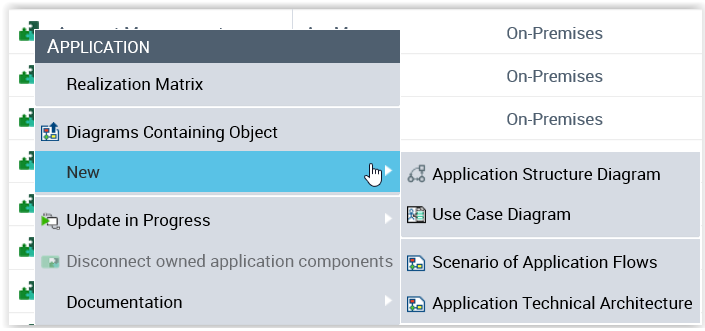
With HOPEX Application Design, an application can be described by several types of diagram:
• an application structure diagram: it is used to represent the interactions between the application components in the form of exchange contracts.
 For more details, see Creating an Application Structure Diagram.
• an Application Technical Architecture Diagram.
An application technical architecture describes one of the configurations possible for application deployment. It describes how the different technical areas of the application are connected to each other and the technologies and the communication protocols that they use. An application can have a number of possible technical architectures (E.g.: autonomous installation, horizontal or vertical deployment, etc.)
You can access the list of technical application architectures of the current project in the Application Architecture Design pane.For more details on adding applications, see Creating an Application Technical Architecture Diagram.• A scenario of application flows: it describes the flows exchanged between the IT services or the micro-services used by this application. A scenarios can represent a particular application use case or more globally all the flows exchanged within this application.
For more details, see Using a Scenario of Application Flows Diagram.To create an application diagram:
1. Display the applications list.
2. Click the icon of the application and select New followed by the diagram type you want to create.