HOPEX Digital Transformation Desktop presentation
 HOPEX Digital Transformation Desktop is mainly intended for HOPEX web users. Desktops described in this guide are accessible only to HOPEX Web desktop.
The menus and commands available in HOPEX Digital Transformation Desktop depend on the product licenses that you have and on the profile with which you are connected.
To switch to another desktop without logging out from Switching Between Profiles:Home Page
All HOPEX Digital Transformation Desktop users have access to the Home page that provides access to the tiles used in Enterprise Architecture.
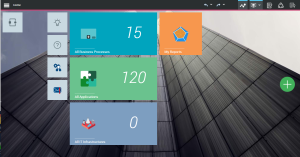
The tiles of HOPEX Digital Transformation Desktop Home page are:
• My workflows: gives access to the list of your active or completed workflows.
• My Reports: gives access to all reports improving a better understanding of models.
For more details on the use of these reports, see "Generating Reports”.• New Idea to access idea management.
to access idea management.• Help to access the HOPEX documentation.
to access the HOPEX documentation.• Alert Management to access the management of your alerts.
to access the management of your alerts.• Option to access to HOPEX options.
to access to HOPEX options.The standard business tiles are:
• All Business processes: provides access to the list of all processes of your enterprise.
• All applications: provides access to the list of applications of your enterprise.
• IT infrastructures: provides access to the list of all IT infrastructures of your enterprise.
• A add tile button  .
.
.Digital transformation architect desktop
The users connected to this profile have access to the panes associated to the solutions proposed in HOPEX Digital Transformation Desktop.
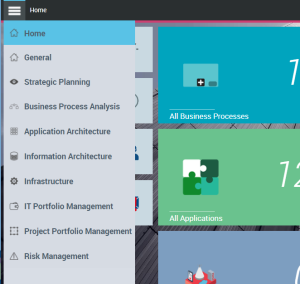
The General pane
The General pane provides access to the following menus:
• Hierarchy: provide access to a hierarchical tree that aggregates all the trees of each solution.
For more details on these hierarchical trees, see Using solutions with HOPEX Digital Transformation Desktop.• Tools: provides access to the group of tools available for each solution.
For more details on these tools, see Using solutions with HOPEX Digital Transformation Desktop.• Reports: enabling access to the group of reports available for each solution.
For more details on the use of these reports, see "Generating Reports”.• Idea Management: which enables access to all the functionalities dedicated to the management of evolution projects ideas.
For more details on managing Ideation, see Managing Ideas with HOPEX Digital Transformation Desktop.• Collaboration Overview: which enables access to all collaborative tools provided by HOPEX.
For more details on the use of collaborative tools, see "Accessing collaboration in HOPEX", page 510.• History: which contains all the objects you access or modify.
For more details on the use of history, see "Using the History", page 194.• Favorites: to access to important objects and to usual actions.
For more details on the use of favorites, see "Managing Favorites", page 191.The Strategic Planning pane
The Strategic Planning pane provides access to the facilities of the HOPEX Business Architecture solution.
The Business Process Analysis pane
The Business Process Analysis pane provides access to the facilities of the HOPEX Business Process Analysis solution.
The Application Architecture pane
The Application Architecture pane provides access to the to the facilities of the HOPEX IT Architecture solution.
The Information Architecture pane
The Information Architecture provides access to the facilities of the HOPEX Information Architecture solution.
The Infrastructure pane
The Infrastructure pane provides access to the facilities of the HOPEX IT Architecture solution.
The IT Portfolio Management Pane
The IT Portfolio Management pane provides access to the facilities of the HOPEX IT Portfolio Management solution.
The Project Portfolio Management Pane
The Project Portfolio Management pane provides access to the facilities of the HOPEX Project Portfolio Management solution.
The Risk Management Pane
The Risk Management pane provides access to the facilities of the HOPEX Risk Mapper solution.
Digital transformation functional administrator desktop
In addition to navigation panes provided for the digital transformation architect, the digital transformation functional administrator has access to:
• The Environment pane
• The Administration pane
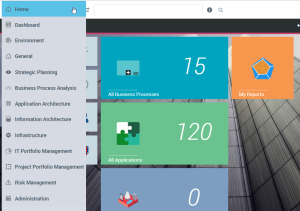
The Environment pane
The Environment pane provides access to the working context management features.
The Administration pane
The Administration pane provides access to the users and profiles management features.
For more details on managing users, see "Managing Users", page 21.Presenting the second levels of the navigation tree
Whatever the solution selected at the first level of the navigation tree, the HOPEX Digital Transformation Desktop users have access the menu identically presented.
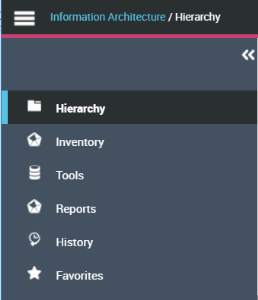
• Hierarchy, enabling access to the solution hierarchical tree.
For more details on these hierarchical trees, see Using solutions with HOPEX Digital Transformation Desktop.• Inventory, enabling access to the list of main objects used in the solutions.
For more details on the each solution inventory, see Using solutions with HOPEX Digital Transformation Desktop.• Tools, enabling access to the tools provided in the solutions.
For more details on these tools, see Using solutions with HOPEX Digital Transformation Desktop.• Reports, enabling access to the group of reports available for each solution.
For more details on the use of these reports, see "Generating Reports”.• History, which contains all the objects you access or modify.
For more details on the use of history, see "Using the History", page 194.• Favorites, to access to important objects and to usual actions.
For more details on the use of favorites, see "Managing Favorites", page 191.