Business data reports
HOPEX Information Architecture offers different types of reports designed to analyze the business data defined in the repository.
 For more details on the risk scope, see "Generating Analysis Reports"Reports on the diagrams available in standard mode with HOPEX are also accessible with HOPEX Information Architecture.
Accessing Reports
To access HOPEX Information Architecture reports:
 Click the navigation menu, then Reports.
Some analysis reports are embedded in the repository objects. These reports are available in the properties of these objects, in the Reports page.
Description Reports
The View Report
See The View Report.
Glossary Report
HOPEX Information Architecture provides a ready-to-use glossary report to automatically build the business glossary of terms derived from a set of Business dictionaries. For each term, the glossary displays a list of associated definitions with their text, synonyms and components list.
Report parameters
This consists of defining report input data.
|
Parameters
|
Object type
|
Comment
|
|---|---|---|
|
List of libraries
|
Library
|
Not mandatory
|
|
List of business dictionaries
|
business dictionary
|
Mandatory if no library
|
|
Example option
|
yes or no
|
Used to display the business information examples
|
|
Show the component type icon
|
yes or no
|
|
Report example
The example below enables viewing of terms and their links with contexts.
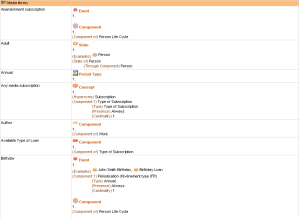
Realization report
Word Cloud Reports
Amount of Information in Information Areas
This report template relates to areas of an information container.
In the generated report, the size of the area name is proportional to the number of information that compose the area.
Extent of the Description of the Information
This report template relates to information containers (business dictionary, data dictionary, database) and display the corresponding elements: concepts, classes, tables, etc.
In the report, the size of the element name is proportional to the number of information that characterize it (for example attributes and relations that characterize a class).
Use of Information in Data Area
This report template relates to information containers (business dictionary, data dictionary, database) and display the corresponding elements: concepts, classes, tables, etc.
In the report, the size of the element name is proportional to its use in the information areas.
Data usage reports
Use of information held by a container
For the object selected as input (eg: a package), the report displays:
• the information that it holds (eg: classes or data views)
• the areas that use this information, with which access rights
• the applications that use the areas (via data stores that are used to declare them on the applications, application systems, application service or micro-service), and through which components (in read-only or read/write).
A report template presents this information in the form of a dendrogram, another report template in the form of a table.
Report parameters
This consists of defining report input data.
Parameters | Object types |
|---|---|
Subject | Business dictionary Database Package Data model Catalog of NoSQL data building block Data type packages |
Use of information in an domain
For the object selected as input (an area), the report displays:
• the information used (eg: classes or data views in the case of an application data area), with which access rights.
• in which applications the selected area is used (via data stores that are used to declare them on the applications, application systems, application service or micro-service), and through which components (in read-only or read/write).
Report parameters
This consists of defining report input data.
Parameters | Object types |
|---|---|
Subject | Application data area Logical data area Business information area File structure Relational data area NoSql data area |
A report template presents this information in the form of a dendrogram, another report template in the form of a table.
Use of information of an information map
The input parameter is an information map that can group together one or more area(s).
This report displays
• the areas and the data that it uses, with the access rights for this data.
• in which systems (applications, application systems, application services or micro-service) the areas are used and with which components of these systems, specifying the access mode (read-only or read/write).
Use of information
The root object of the report consists of an item of information (concept, class, data view, table, etc.). For this root, the report displays:
• the areas that use this information, with which access rights
• in which systems (applications, application systems or micro-service) these areas are used and with which components of these systems, specifying the access mode (read-only or read/write).
Report parameters
This consists of defining report input data.
Parameters | Object types |
|---|---|
Subject | Class Concept State concept Event concept Concept type Entity Period type Representation type Table Datatype Concept view Data view Physical view |
Use of information of the domains of a container
For the object selected as input (a container), the report displays:
• the areas owned
• the domains used by the areas, with which access rights
• the systems that use these areas and the access mode of the components of these systems (read-only or read/write)
Report parameters
This consists of defining report input data.
Parameters | Object types |
|---|---|
Subject | Business dictionary Database Package Data model Catalog of NoSQL building blocks Data type package |
Report DataSets
A Report DataSet is a data table created using repository objects, on which instant reports can be generated.
HOPEX Information Architecture provides different types of Report DataSets.
Creating a Report DataSets
To create a Report DataSet
1. Click the navigation menu, then Reports.
2. In the navigation pane, click Other Reports.
3. In the edit area, click My Report DataSets.
4. Click New.
5. Specify:
• the name of the report
• the holder (optional)
• the definition of the Report DataSet, on which the report is based
6. Click OK.
Example of a Report Dataset
Definition of terms used
This type of Report DataSet has a list of terms as input parameter.
Using selected terms, you can, for example, create a "matrix" type instant report that presents the list of concepts that use the terms in question.
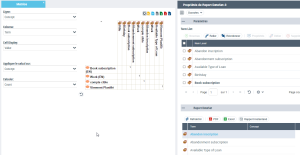
To create an instant report for this type of Report DataSet:
1. Create a "Term definition" Report DataSet type.
See above Creating a Report DataSets.2. Open the properties of the Report DataSet.
3. Display the Data page.
4. (If needed) In the Parameters section, click Add and select the input parameters, here the terms.
5. (If needed) In the Report DataSet section, click Refresh.
6. In the Report DataSet section, click Instant Report.
7. Select the required instant report, here a matrix.
8. Click OK.
Business dictionary x Concept Matrix
A concept can be referenced by one or more business dictionaries.
This Report DataSet has a list of business dictionaries as input. It is used to create a "Matrix" type business report that lists the concepts referenced in the selected business dictionaries.
To create an instant report for this type of Report DataSet:
1. Create a "Business Dictionary Matrix x Concepts" type Report DataSet.
See above Creating a Report DataSets.2. Open the properties of the Report DataSet.
3. Display the Data page.
4. (If needed) In the Parameters section, click Add and select the input parameters, here the terms.
5. (If needed) In the Report DataSet section, click Refresh.
6. In the Report DataSet section, click Instant Report.
7. Select the required instant report, here a matrix.
8. Click OK.