Analyzing Control Assessment Results
Instant reports
Instant reports offer a statistical graphic analysis of the data. You can generate instant reports on a selection of assessments in order to view certain data graphically or to compare the assessments for specific characteristics.
To launch an instant report on a set of assessment of a control:
1. Display the properties of the control and click the Assessment page.
2. Select the assessments in question.
3. Click theInstant Report button.
4. Select the type of report to create and then, if necessary, the characteristics to be analyzed.
Example
Find below an example of control assessment Heatmap report. From the selected characteristics (effectiveness and control level in this example), this report offers a graphical representation of results.
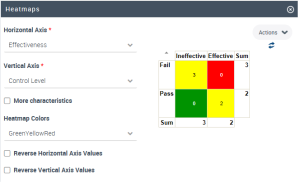
For more information on instant reports, see "Managing Instant Reports".
Dedicated analysis reports
In addition to instant reports, HOPEX IRM provides dedicated report templates that facilitate the analysis of the assessed controls. For more details, see Assessment Follow-Up Reports.