Processing-Related Reports
Accessing Processing-Related Reports
To generate processing activity-based reports:
1. Select a processing activity.
2. Select a report available from the ... > Reports button drop-down menu.
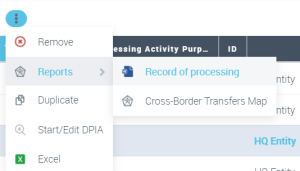
Records of processing
About the record of processing
The information collected in the record of processing is the core of the GDPR documentation system. It must remain available at all times in the event it is requested by the Data Protection Authority.

The record of processing is about who processes what personal data, where, why, and how.
Creating a record of processing
To generate a record of processing in the form of a Word document:
1. In the navigation menu, click Record of Processing.
2. Select a processing activity and from the Reports drop-down button select Record of Processing.
A Word document is generated. The contents is as follows:
• Introduction: it describes data subject rights, the principle of data transfers and security measures.
• List of all processing activities
• Detailed description of the processing activity selected
• Data protection role
• Sensitive activities
• Legal basis
• Data categories and Data subject categories
• Notice and consent management
• Data subject rights
• Transfers to third parties
 See Data Transfers.
• Security measures
See Data Transfers.• Sub-processing elements
• Attachments
Cross-border transfer map
You can generate a cross-border transfer map displaying a world map with the data transfers selected.
Pre-requisites to using cross-border transfer map
Make sure that:
• a country was specified on the HQ establishment of the legal entities involved.
For more information, see Specifying the country of a legal entity.• you specified both a recipient and a sender on the transfer
For more information, see Specifying data transfers on a processing activityContent of the transfer map
The country of the recipient determines whether the transfer is adequate or not.
If a transfer is non-adequate, you can source the target establishment and discover which safeguards are implemented in this establishment. For more information on safeguards, see Defining Transfer Safeguards.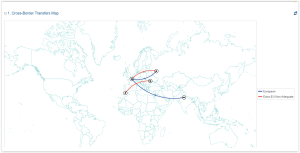 You can use the mouse wheel to zoom in or out.
Additional information about transfers
For more information on how to create transfers, see Specifying data transfers on a processing activity.
For troubleshooting, see About Transfers.
CNIL-Specific Report
HOPEX GDPR enables you to generate a report which conforms to CNIL requirements (French National Commission to protect personal data and preserve individual liberties).
Activating the CNIL Report
This Excel report concerning processing activities is an optional output of the record of processing. You therefore have to activate a specific option to be able to generate it.
To activate the CNIL report:
1. In the main menu, select Settings > Options.
2. Unfold the GDPR folder.
3. Select "Activate the CNIL report in the list of record of processing activities".
4. Click OK.
Prerequisites for the CNIL report
For the processing activities to be included in this report, you must have specified the Data Protection Role "Data controler" in their property page.
Generating the CNIL report
To generate this report:
1. In the navigation menu, select Record of Processing.
2. Select the processing activities of interest to you (those for which the "Data Controler" data protection role has been specified).
3. from the toolbar More button, select Reports > Record of Processing - CNIL format.
If no processing activities match the appropriate scope, a warning appears.4. Specify the Legal entity (data controller) who is exporting the record of processing.
Only the legal entities linked to the processing activities having "Data Controller" as a data protection role are suggested here.5. Click OK.
The Excel report is generated.