Managing Departments
 To create a department, see Creating Departments.
To access departments in HOPEX GDPR:
 In the navigation menu select Organization > Departments.
In the property pages of a department, you can:
• specify general characteristics
• define the DPO et deputy DPO, which enables to display automatically an organizational chart for DPOs.
For more information, see Viewing the DPO Organizational Chart.• manage users
Defining Department Main Characteristics
The following information can be provided:
• Department name
• Legal entity associated
It is mandatory to specify a legal entity on a department.• Department manager
• Deputy DPO: person appointed by the DPO to monitor the department
• IT support correspondent: person providing IT support.
Connecting Users to a Department
You need to add users so that activity owners could create processing activities.
To connect users to a department:
1. In the properties of a department, select the Users tab.
2. Connect the relevant users.
Defining Establishments
An establishment corresponds to the location (site) of a legal entity.
You can describe establishments in the entity property pages.
Creating an establishment
To create an establishment:
1. In the navigation menu, click Organization > Legal entities and DPOs.
2. In the properties of a legal entity, select the Establishments tab.
You can specify the following information for an establishment:
• Name of the establishment
• Country
• Transfer safeguards
 Transfer safeguards are measures taken to ensure the legitimacy of data flows towards the establishment.For more information see Defining Transfer Safeguards.
• Certifications if applicable
For more information, see Specifying security measures on a processing activitySpecifying the HQ establishment for an entity
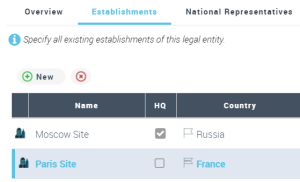
When you create several establishments, you need to define which of them represents the headquarters.
To specify the HQ establishment:
1. In the navigation menu, select Organization > Legal Entities and DPOs.
2. In the legal entity property page, select the Establishments tab.
3. Select the HQ check box.
Specifying the country of a legal entity
You can specify the country on the main (HQ) establishment of the legal entity.
To specify the country of a legal entity:
1. Open the property pages of the legal entity and select the Establishments tab.
2. Specify a Country for the establishment which was declared "HQ".
It is important to associate a legal entity with a country to illustrate transfers. For more information on transfers, see:• Specifying data transfers on a processing activity
• Cross-border transfer map