Administration Desktop Description
To access the Administration desktop, see Connecting to the Administration Desktop.
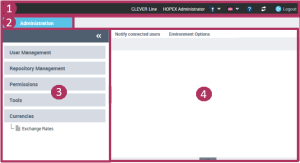
1, Toolbar, 2: Administration tab, 3: Navigation panes, 4: Edit area
The Administration desktop includes:
• a toolbar.
 See Toolbar.
• an Administration tab that contains panes and trees to select the objects to manage.
• an edit area to manage objects.
See Edit area.Toolbar

The toolbar displays the name of the user connected as well as the profile with which the user is connected.
From the Administration desktop toolbar, you can:
• access your account  (My account) to:
(My account) to:• modify your password
Your password must contain between 8 and 16 characters, with at least one letter, at least one figure and at least one special character.• modify your options
For information on options available at user level, see Available Option Groups (User Level).• modify the theme of your desktop
The theme used in the Web applications also defines the theme used in the reports. To customize reports, see “Customizing your Reports (Web Front-End)", page 407.• manage your alerts
• obtain information on your licenses
• diagnose the installation
This information simplifies error diagnostics. It can help explain application slow response time.• download the HOPEX system information report
• reinitialize your personal parameters
• access the documentation
• modify the interface data language 
To manage languages, see Managing Languages in Web Applications.• access online documentation 
• update your desktop 
• disconnect from the Administration desktop  .
.
.Navigation panes and trees
In the Administration desktop, the Administration tab contains the following panes:
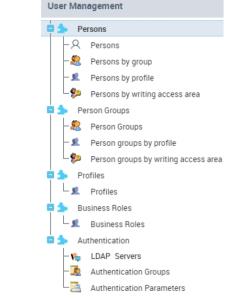
• the persons
The Persons by reading access area sub-folder is available if reading access management is activated.• the person groups
The Person groups by reading access area sub-folder is available if management of reading access is activated.• the profiles
• the business roles
• the authentication
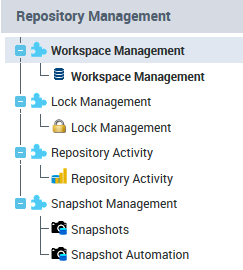
The LDAP servers folder is available only if LDAP authentication is the user default authentication mode, see Defining default authentication mode to LDAP.• the Repository Management pane to manage the workspaces, the locks, the repository and the snapshots
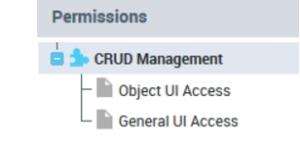
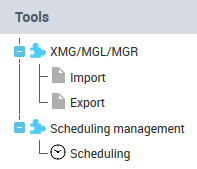
• the Tools pane to:
• import or export objects with the Excel import/export wizard
• import or export objects in different formats
• import Visio diagrams
• manage scheduling
• Currency pane to manage exchange rates.
See the "Functional Administration" chapter for the HOPEX solutions concerned.Edit area
When you select an element in the left part (navigation panes and trees), the management page of this element appears in the edit area.
You can:
• notify connected users by e-mail (Notify connected users)
• manage the environment options (Environment Options)