Creating Questionnaire Templates
To create a questionnaire template associated with an assessment template:
1. In the properties of an assessment template that interests you, select Assessment Template Definition > Questionnaire Template.
2. Create a questionnaire template.
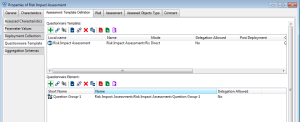
3. In the Questionnaire Element section, click New.
A dialog box opens proposing creation of questions or question groups.
 For more details, see:
You must also initialize the questionnaire template to create questionnaire elements.
For more details, see Initializing questionnaire templates.4. Click Next.
Questionnaire presentation parameters are displayed.
5. Define the parameters that interest you.
For more details, see Defining Questionnaire Presentation.6. Click Finish.
The new questionnaire template appears in the assessment template properties dialog box, Assessment Template Definition tab, Questionnaire Template subtab.
You can also access questionnaire templates of an assessment template by expanding the Definition folder of the assessment template, then the Questionnaire Template sub-folder.Initializing questionnaire templates
You can create your questionnaire template in two ways:
• by manual creation of questionnaire elements
For more details, see Questionnaire Contents.• by automatic initialization
Initialization enables simple creation of questions from assessed characteristics. Initialization automatically creates:
• questionnaire elements
• answers
• possible answer values
• quotation rules connected to the appropriate macro.
For more details on these elements, see Questionnaire Contents.To initialize a questionnaire template:
 Right-click the questionnaire template and select Initialize Questionnaire Template.
Initialization is started from assessed characteristics and allows viewing of objects created.
Managing questionnaire template languages
To allow the user to complete a questionnaire in his/her data language, it can be useful to update the "Neutral" language.
If the questionnaire has not been defined in the user language, the respondent cannot view the questions/answers in the questionnaire.
To allow the user to view the questionnaire in his/her data language:
Right-click the questionnaire template concerned and select Update Neutral Language.The effect of this command is to update questionnaire template element titles to "Neutral" language from the current language.
These titles are used by default in the case of absence of translation in a language when the respondent completes the questionnaire.