Creating Question Groups
 A question group defines a set of questions presented in groups. Questions are created and ordered in the question group.
To create a question group:
1. See Accessing Questionnaire Elements.
2. Click New.
3. In the dialog box that appears, select Question Group and click OK.
4. Specify the Question Group Title, that is, the character string displayed in the question group header.
5. Specify the following fields as required:
• Display Condition enables definition, by MetaTest, of the question edit condition.
For example, the question group is only displayed if the user has answered "OK" to another question of the questionnaire element.
 For more details, see Conditions on question display.
• Mandatory Condition enables definition, by MetaTest, of the mandatory or optional nature of answering group questions.
For more details, see Conditions on question display.• Delegation Allowed specifies if the answer to group questions can be assigned to another person by delegation.
6. In the Questions section, create as many questions your group should contain.
For more details on question creation, see Questions and Answer Types.The Specific check box enables supply of the group explicitly by dynamically searching for specific questions declared on assessable objects or MetaClasses.
In this case you must specify:
• the Questionnaire Objective.
For more details, see Creating a Specific Question Group on a MetaClass.• the MetaClass concerned or the list of assessable objects, depending on the button selected.
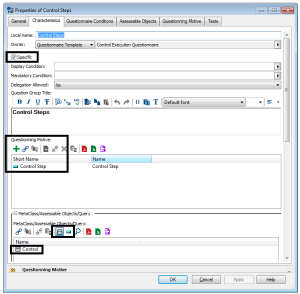
"Control Steps" question group properties dialog box