Preparing Audits
Supervision of audit progress is assured by the lead auditor. In the audit preparation phase, he/she establishes the work plan and assigns activities to auditors.
Creating Work Programs Manually
The lead auditor must create a work program to specify content of the audit.
To access the work program:
 In the page of an audit, select the Work Program tab.
In this tab you can create a tree of content of your audit.
The basic element of the audit is the audit activity. This enables assignment of responsibility to the auditor.
Constituent elements of an audit
A theme can be used to group audit activities and their workpapers, that is to organize audit content. In this case they serve as "folders".
If audit scope comprises processes, themes can represent processes and sub-processes.
A theme can:
• serve as a folder enabling organization of work program structure
• correspond to a business process
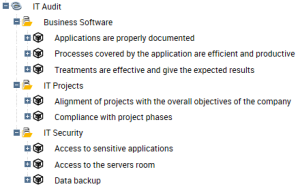
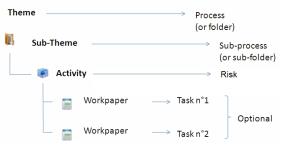
 From this tree, the auditor can create workpapers, findings and recommendations. For more details, see Audit Execution.
Creating audit themes
Audit content can be divided into themes. Before creating activities and workpapers, you can therefore create audit themes.
To create an audit theme:
1. Open properties of the audit concerned.
2. Click Work Program.
3. Click the icon of the audit and select New > Audit Theme.
The theme created appears in the tree of the work program.
4. Display properties of the theme.
You can:
• Modify its name.
• Select a parent audit theme (if you want to create a tree of themes).
• Enter a comment.
5. Click OK.
You can view the tree of themes and sub-themes created. You can now create audit activities and workpapers.
Specifying an audit activity
An audit activity is an element of an audit that can relate to a set of processes, applications, risks or controls to be audited in an enterprise organization unit. It is assigned to an auditor.
To create an audit activity:
1. Open properties of the audit concerned.
2. Click Work Program.
3. Click the audit (or audit theme) and select New > Audit Activity.
The audit activity created appears in the tree of the work program.
4. Display properties of the activity.
5. Enter the name of the audit activity.
6. Connect the audit activity to a Theme if you wish the activity to be located under a theme in the tree.
7. Select the Activity Owner, who can be an auditor or lead auditor of the current audit.
8. Indicate the Estimated Workload.
9. Click OK.
You can also create audit activities in the Activities tab of the audit properties. In this tab, you can select several activities and trigger a mass transition using the Workflow button.Specifying risks connected to an audit activity
In the page of an audit activity, Activity Scope section, you can specify risks concerning the activity.
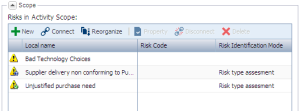
To create a risk on an activity:
1. Open properties of the activity.
2. In the Characteristics tab, expand the Scope section.
3. Click New.
The risk creation dialog box appears.
4. Enter the name of the risk and click OK.
For more details on users, see Defining and Assessing Risks.
Creating Workpapers
Workpapers are files or work documents that serve as a basis for the auditor in execution of the audit.
They can form the starting point for tests, which contain points to be evaluated (questionnaires containing questions/answers).
 A workpaper comprises points to be checked on a given subject in the course of an audit activity.
To create a workpaper:
1. In the properties of an audit, select the Work Program tab.
2. Select the activity concerned and display its properties.
3. In the Characteristics page of the audit activity, Workpapers section, click the New button.
You can also create workpapers from the Work Program tab of an audit.The workpaper appears in the page of the activity, and under the work program tree of the audit.
4. In the work program, select the paper to display its Properties.
5. Enter a name and your comments.
6. Click OK.
Completing workpapers and questionnaires is detailed in "Audit Execution". See Specifying Workpapers and Questionnaires.