Managing Recommendations
A recommendation describes what must be done to correct a noncompliance detected during an audit.
Accessing recommendations
To access your recommendations:
2. In your Explorer desktop home page, click My Recommendations.
Recommendations are classified according to their status:
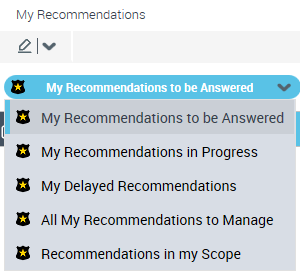
The recommendations to be answered are those for which you must:
• submit an action plan, or
• specify a progress percentage for the action
Implementing recommendations
You may be required to manage recommendations following testing activities or production of the final audit report.
As a recommendation owner, you may:
• create actions whose objective is to implement the recommendations.
• specify a progress percentage for the actions
For more details on recommendations, see:
Creating an action within the framework of a recommendation
To create an action:
1. See Accessing recommendations.
2. In the properties of the recommendation, select the Action Plan tab.
3. In the Actions section, click New.
4. Open the properties of the action created.
5. Modify its name if necessary, enter a date limit and an action Owner.
 The list available in the Owner field corresponds to the list of auditees defined on the audit.
Submitting action plans
Actions created and assigned to appropriate users constitute an action plan.
You may submit the action plan to the lead auditor or the audit director via the recommendations workflow.
To do this:
1. See Accessing recommendations.
2. Right-click the recommendation name and select Action Plan to be Submitted > Submit Action Plan.
The lead auditor or audit director validates the action plan by return.