Implementing Recommendations
When the closing report is circulated, recommendations are automatically sent to recommendation owners.
Accessing recommendations
The recommendation owner receives a single e-mail for all recommendations addressed to him.
To access recommendations to be executed:
 Select Home > Recommendations et actions. The Recommendations to Execute folder presents the list of recommendations assigned to you.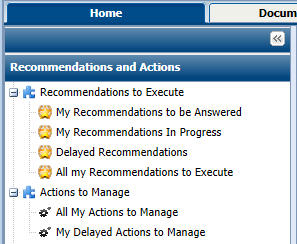
Implementing Actions
The recommendation owner must create actions whose objective is to implement these recommendations.
Creating actions
To create an action:
1. Open the properties of an audit.
2. In the Recommendations tab, select a recommendation and click Properties.
3. In the properties of a recommendation, select the Action Plan tab.
4. In the Actions section, click New.
5. Open the properties of the action created.
6. Modify its name if necessary, enter a date limit and an action Owner.
 The list available in the Owner field corresponds to the list of auditees defined on the audit.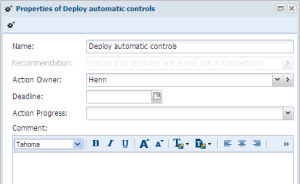
7. Click OK.
Submitting the action plan
Actions created and assigned to appropriate users constitute an action plan.
This action plan is submitted to the lead auditor or the audit director via the recommendations workflow.
To submit the action plan:
Right-click the recommendation name and select Action Plan to be Submitted > Submit Action Plan.The lead auditor or audit director validates the action plan by return.
Following up recommendation implementation
When the action plan has been validated, actions are implemented by the auditees.
Following up recommendation progress
After a predetermined period, the audit director or lead auditor can request information on progress of recommendations.
The audit director can consult the list of recommendations of an audit plan in the properties of this audit plan, in the Recommendations tab. A Follow-up attribute indicates recommendations that are linked to a follow-up audit.
Specifying recommendation progress
The recommendation owner must inform the audit director on progress of his actions.
To indicate progress of recommendations:
1. In the page of a recommendation, select the Action Plan tab.
2. In Progress Rate, specify an execution percentage of the action plan (that is of the recommendation).
3. Click OK.
The recommendation owner can also indicate action progress in the page of the action.Following up Recommendations
An analysis report assures follow-up of recommendations. This report is accessible to the audit director or the functional administrator.
To access this type of report:
1. Click Audit > Decisional Reports.
2. Select Recommendation Reports.
To create a recommendation report:
1. Click New and open the report created.
2. In Parameters, connect the objects that interest you:
• Audit plans
• Audits
• Process
• Risks
• Entities
3. In the Reports tab, you can see:
• Recommendations breakdown by priority
• Recommendations breakdown by progress (delayed, etc.)