Managing Sub-Processing Activities
If you need to have a global view you may want to deal with the general processing only (which means there is no need for sub-processing activities).
For more information, see:
However if there is an IT application or a sub-contractor involved, you may want to define sub-processing activities in order to properly describe the processing activity.
Information can be entered both at the general processing and sub-processing levels. Inconsistencies may result from this double entry.
If consistencies are detected, a warning is displayed and indicates how many inconsistencies have been found. For more information on inconsistencies, see Inconsistency report and dashboard.
Creating a sub-processing activity
To create a sub-processing activity:
1. Access a processing activity and open its property page.
2. Select the Details tab.
3. In the Details View section, click New Sub-Processing.
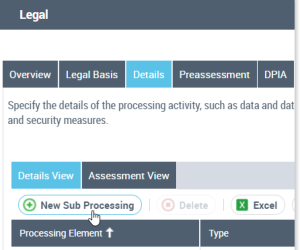
4. Select a type of sub-processing activity
• Organization
• Subcontractor
• Application
You can provide information about the data protection role of the application provider or subcontractor.
Describing a sub-processing activity
To describe a sub-processing activity:
1. Select the sub-processing activity created.
2. Notice that the property page applies to the sub-processing activity:
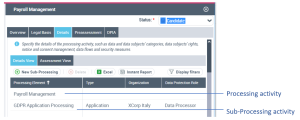
The information registered in the sub-processing must be consistent with the information recorded in the general Processing.
 If inconsistencies arise, they are reported in the dashboard of the Overview tab. For information about inconsistencies, see Inconsistencies.