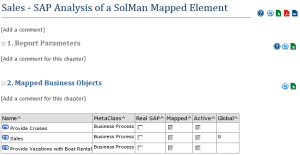
Solman Project Mapped Element Report
This report displays a list of business objects mapped totally or partially with a set of objects originating from a SolMan project.
Accessing the report
You can launch this report from a SolMan mapped element.
Displayed attributes
For each object, the following properties are displayed:
• Object Name
• MetaClass
• REAL SAP: specifies whether the mapped SolMan element is a real SAP object.

This attribute can be edited.
• Mapped: indicates whether a SolMan element is mapped to this object. The cell can be entered with:
• a check mark: the object is mapped with one SolMan element
• no check mark: the object is NOT mapped with a SolMan element.
• "X": the object is mapped with several SolMan elements.
• Active: indicates if the mapped SolMan element is active in SAP Solution Manager. It refers to the "In scope" concept.
This column is relevant only when the object is mapped with one SolMan element only.
• Global: corresponds to the Global attribute which indicates if in SAP Solution Manager this attribute is:
• local to the project
• global (defined and inherited from a more general project such as a template project).
This attribute is read-only.