Managing Template Projects
In complex environments with for instance several locations with country-specific differences, several implementation projects may derive from a common template project.
Deploying a template project is a way to transform a project into a solution. When a template project is deployed, the global processes defined in the templates are said to be "localized".

Managing SAP template projects and maintenance projects is very similar, except that the scope is larger when managing template projects.
Importing a template project
When you need to modify a template project in SAP Solution Manager after it has been deployed (that is to say used for other projects), you have to import it into HOPEX SAP Blueprint.
Here is what occurs in HOPEX SAP Blueprint when the template project is imported.
• HOPEX SAP Blueprint detects the template project has been used for an implementation project.
• The template project is locked against changes made in other projects.
• A new version of every object of the template is created.
Then you can make changes to the template project without impacting the original implementation project.
Project template versions
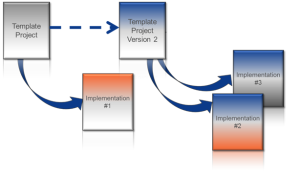
In HOPEX SAP Blueprint you obtain multiple levels of versions, as shown in the figure hereafter.
A new version of the project template is created when:
• you import or synchronize a project template that has given birth to an implementation project
• you import an implementation project based on a template project
In the latter case,
HOPEX SAP Blueprint connects the implementation project objects to the processes initially described in the template project.
HOPEX SAP Blueprint creates new versions of the objects for each modification made in the new project.
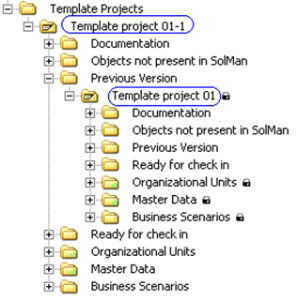
Accessing previous versions of template projects
Template contents is versioned in HOPEX SAP Blueprint after each new implementation, that is to say after you have re-imported the project template into HOPEX SAP Blueprint.
To access the initial template project :
2. In the Template project folder, unfold the Previous version folder.
 A template project is used to create and distribute a template defining the project structure.