Importing Data in Offline
To execute the test in Offline mode, you must extract it from HOPEX Internal Control and import it in the Offline application.
You must import the test in file mode: a file containing test data is exported from HOPEX Internal Control and imported in the Offline application.
Importing the Test in File Mode
Extracting the test from HOPEX Internal Control (Web)
Extraction of test activities content is carried out by the internal controller handling the test and wishing to work Offline.
The test plan should have been previously validated and the test published.
To extract test content from HOPEX Internal Control:
1. In HOPEX Internal Control, open the page of the test work program.
2. Click the icon of the test and select Export Offline (File).
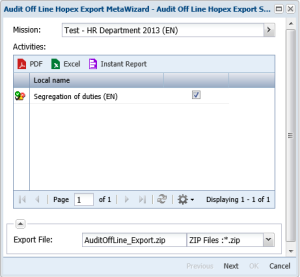
The export dialog box appears. It contains the list of test activities assigned to you.

All activities of the test are extracted and imported in the internal controller workstation, but only those selected for execution Offline are active (Offline attribute has value "Offline").
4. Click Next.
5. Click OK.
On completion of processing, a message proposes that you save the generated file. Message presentation varies according to the navigator.
6. Click Save as and specify location of the generated file.
The downloaded.zip is named AuditOffLine_Export.zip, but you can modify its name.
Importing the file in HOPEX Offline
To import the test in HOPEX Offline:
1. Double-click HOPEX Audit Offline.
2. In the connection dialog box, click Import Audit (File).
3. Select the .zip file containing the test.
If the test already exists in HOPEX Offline, a message asks if you want to reinitialize the repository. It is also recommended that you back up the repository.
A window indicates import progress and completion.
4. Click OK.
5. Returning to the connection dialog box, click Start HOPEX.
All objects (users, workflows, etc.) attached to the test are imported. The writing access diagram is automatically compiled.
Managing Activities Online and Offline
So that an activity cannot be modified simultaneously in HOPEX Internal Control and HOPEX Offline, an "Offline" attribute is available in its properties.
This attribute takes value:
• "Online" when the activity is in the course of execution in . HOPEX Internal Control
• "Offline" when the activity is in the course of execution in HOPEX Offline.
The attribute value changes automatically during data exchanges between the two applications.