Handling an Instant Report
You can:
Updating an instant report
A message (at the top of the report) specifies the date of the last generation of the instant report as well the time required for generation. If the data contained in the list of objects changes, you must refresh the instant report to take these changes into account.
When the instant report is updated, the generation date message for the instant report is not displayed.
To update an instant report:
1. Access the instant report.
2. Click the refresh button

beside the generation date information of the instant report.
Obtaining the list of objects in a data series
To get the list of objects making up part of the chart:
1. Access the instant report.
2. Click the chart part concerned.
The list of objects contained in this part appears in a new List tab.
In the list, you can click:
• Properties 
, to view the properties of an element in the series.
• PDF 
or
Excel 
, to export the elements of the series in .pdf or .xls format.
• Instant Report 
, to generate an instant report for the series.
Hiding a data series
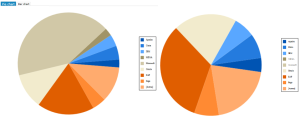
For improved visibility, you can hide data series in the report graphic.

This feature is available with
HOPEX (Web Front-End) only.
To show/hide a data series:
1. Access the instant report.
2. In the report key, click the data series in question. In the key, the series name is grayed.
The series is not display anymore in the chart.
You can mask several series.
3. In the key, click the series again to reintegrate it in the report.