Report (MS Word) Customization Functions
You can use the edit functions of MEGA to produce high quality reports using Microsoft Word for Windows™ (from now on referred to as Word).
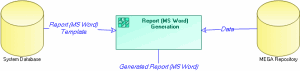
Reports (MS Word) are created from report templates (MS Word), in the same way as MS Word documents are created from MS Word document templates.
Report (MS Word) storage
These report templates (MS Word) are stored in the MEGA system repository. This system repository contains all standard supplies that enable MEGA operation, for example report templates (MS Word), queries, Web site templates, etc.
Explained here is how you can create and customize report templates (MS Word) to produce reports (MS Word) matching your company standards.
Use of MS Word
To effectively handle reports (MS Word), you do not need to have an in-depth knowledge of MS Word. However, if you want to modify the content or format of reports (MS Word) and report templates (MS Word), you must be familiar with the styles, document templates, and fields as used in MS Word.
The purpose of this guide is not to teach you all about MS Word, but to offer a few guidelines on this software.
Use of of reports in MEGA Web Front-End
If you use MEGA via the Web interface to generate your reports (MS Word), you must first convert report templates (MS Word) of the environment to RTF format. Microsoft does not recommend use of MS Word in server mode.

For more details, see "Converting Report Templates (MS Word) to RTF Format", chapter "Managing Environments" in the
MEGA Administration - Supervisor guide.
RTF reports can then be produced and packaged in .docx format.