Managing Your Alerts on Object Modification
To follow modifications carried out on an object, you can:
• subscribe to an alert.
• automatically subscribe to alerts on all objects for which you have issued a post.
When you subscribe to an alert on an object, this alert also includes modifications to all its component objects.
Subscribing to an alert on an object
You can subscribe to an alert on an object from the properties of this object.
To subscribe to an alert on an object:
1. Access the object properties page.
2. In the properties menu bar, select:
• (MEGA Windows Front-End) General > Alerts on Changes.
• (MEGA Web Front-End) Wall then expand Subscriber.
3. Select I Subscribe.
Your name appears in the Subscriber list.

The
Subscriber table lists all persons following this object.
Accessing alert management.
To access management of your alerts on objects:
1. Connect to MEGA.
2. From your MEGA desktop:
• MEGA Windows Front-End: in the MEGA menu bar, select Tools > Alert Management.
• MEGA Web Front-End: in the Miscellaneous toolbar, click My Account and select Alert Management.
The Alerts Management dialog box opens.
3. You can:
• view all alerts to which you have subscribed (My Subscriptions tab).
• subscribe to automatic receipt of notifications and/or e-mails for modifications of objects on which you have issued a post.
• consult properties of an alert already created (in the My Subscriptions tab, select the object and click Properties).
• configure management of your alerts.
• view your alerts of Notification type.
• cancel subscription to an alert.
Subscribing to alerts on objects for which you have issued a post
You can automatically subscribe to alerts on all objects for which you have issued a post.
To subscribe to automatic alerts:
1. Access alert management.
2. Select the My Subscriptions Tab.
3. Select Subscribe automatically to objects for which I have issued a post.
4. Click OK.
When a user dispatches his/her work in which he/she has modified an object for which you have subscribed to automatic alert, you receive an alert.
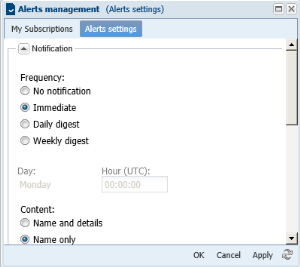
Configuring management of your alerts.
You can receive information by notification or e-mail on modifications to objects you are following.
You can define:
• notification receipt frequency:
• none
• immediate
• daily or weekly digest with choice of day
• content of notifications:
• with or without details
• e-mail receipt frequency:
• none
• immediate
• daily or weekly digest with choice of day
• content of e-mails:
• with or without details
• format of e-mails:
• text
• HTML
To configure management of your alerts:
1. Access your alert management dialog box.
2. Select the Alerts Settings tab.
3. (Optional) In the Notification frame, select receipt frequency and notification content.
When a user dispatches modifications on an object you are following, you receive a notification.
4. (Optional) In the Email frame, select receipt frequency, and notification content and format.
When a user dispatches modifications on an object you are following, you receive an e-mail.
Viewing your alerts of notification type
To view your alerts:
1. Connect to MEGA.
2. From your MEGA desktop:
• MEGA Windows Front-End: in the MEGA menu bar, select View > Collaboration, then in the Collaboration tab, expand the My Notifications folder.
• MEGA Web Front-End: in the navigation panes, select My Notifications.
The Unread Notifications and Read Notifications folders appear.
3. Click the Unread Notifications/Read Notifications to consult your notifications.
Canceling subscription to an alert
To cancel subscription to an alert:
1. Access your alert management dialog box.
2. In the My Subscriptions tab, select the objects for which you no longer wish to be alerted.
3. Click
Unsubscribe 
.