Managing Threads of Posts
In the interests of collaborative work, you can issue a post on an object.
All users subscribing to alerts on this object modifications receive a notification and/or post as soon as you dispatch your modifications, and according to their alert management.
Creating threads of posts on objects
To create a thread of posts on an object:
1. Access the object properties page.
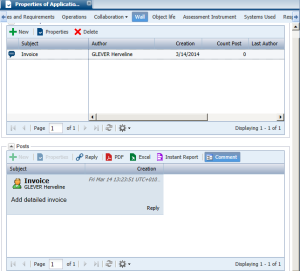
2. Select the Wall tab.
3. In the
Thread of posts frame, click
New 
.
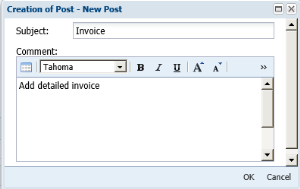
The Creation of Post dialog box appears.
4. In the Subject field, enter the thread subject.
5. Enter your post in the Comment frame.
6. Click OK.
A thread of posts is created.
Your post appears in the Posts frame.
If you are working in:
• a private workspace, other users can access your thread of posts when you have dispatched your updates.
• a collaborative workspace, other participants can access your thread of posts when you have exited your session (saving your updates).
Users subscribing to alerts on object modifications are notified.
Participating in threads of posts
To participate in a thread of posts:
1. Access the properties of the object in whose thread of posts you want to participate.
2. Select the Wall tab.
3. In the Thread of posts frame, select the thread that interests you.
4. In the Posts frame, click Reply.
The dialog box for creation of a new post appears.
5. Enter your post in the Comment frame.
6. Click OK.
If you are working in:
• a private workspace, you must dispatch your updates so that other users receive a notification and see your post.
• a collaborative workspace, you must exit your session, saving your updates, for other participants to receive a notification and see your post. Other repository users do not see thread posts until the collaborative workspace is dispatched in the repository.
Organizing threads of posts on an object
You can organize a thread of posts on an object according to its:
• subject
• creator
• creation date
• number of posts
• author of latest post
• date of latest post
To create a thread of posts on an object:
1. Access the properties of the object in whose thread of posts you want to participate.
2. Select the Wall tab.
3. In the Thread of posts frame, click the header of the corresponding column.
 See "Managing Your Alerts on Object Modification".