Introduction to Web Administration Desktop
Web Administration Desktop
The Web Administration desktop is the Hopex administration application accessible via an internet browser.
This application is used to manage:
• users:
• Persons and person groups,
• profile assignments,
• external authentication
• API Key
• repositories:
• workspaces
• locks
• scheduling
• jobs
• Web sites
• data
• import/export (command files, Excel)
• comparison
This application also gives access to information regarding:
• repository
• repository activity
• repository snapshots
• Data access (with the Hopex Power Supervisor technical module)
• writing access areas
• reading access areas
Accessing Web Administration Desktop
To perform Administration operations via the Web, you must have connection rights to the Web Administration desktop, that is connect with an administration profile.
 At installation, only the Mega user can connect to the Web Administration desktop.
To access Hopex Administration desktop:
1. Start the Hopex application using its HTTP address.
If you do not know this address, contact your administrator.The authentication page appears.
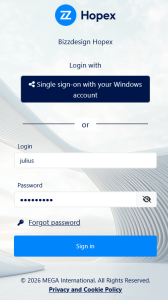
2. Click your own log in button, or use the log in managed by Hopex:
• In the Login field, enter your connection identifier.
• In the Password field, enter your password.
To view your password, click  .
.3. Click Sign in.
When you have been authenticated, the connection page appears.
4. (If you belong to a person group) In the drop-down menu for groups, select the group with which you want to connect or "My assignments" to connect with one of your own assignments.
5. in the Repository field, use the drop-down list to select your work repository.
If you can access only one repository, this is automatically taken into account and the repository selection field does not appear.6. In the Profile field, use the drop-down list to select your administration profile:
• Hopex Administrator, for global management of users and repositories.
• Hopex Administrator - SaaS (in Production environment only).
• <Solution name> Functional Administrator, for a management limited to users.
For information on these profiles, see Administration Profiles Provided.If you have only one (administration) profile, this is automatically taken into account and the profile selection field does not appear.7. Click the Privacy and Cookie Policy link and read the privacy policy, then select I have read and accept the privacy policy.
The Enter button is active.
When you have read and accepted the confidentiality policy, a certificate is automatically linked to your person and this step is not required anymore.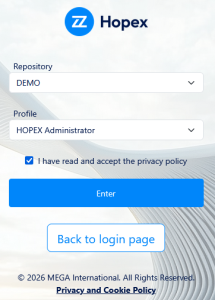
8. Click Enter.
Click Back to login page if you want to return to the authentication page.The Administration desktop appears and the session is opened.