Using a Web Site Template
A Web site can be created from a Web site template (in the same way as a report (MS Word) can be created from a report template (MS Word)).
The Web site template is not intended for generation but only as a template for building the Web site.
Creating a Web Site Template
In a Web site template, you indicate the type(s) of object to be described in the site as well as the pages generated. This avoids you having to specify these at each new creation of a Web site.
To create a Web site template:
1. In Hopex Windows Front-End workspace, select the Utilities window (accessed by selecting View > Navigation Windows > Utilities).
2. Right-click the Web Site Template folder and select New > Web site template.
3. In the Create Web Site Template dialog box, indicate its Name and click OK
 You can base a Web site template on another Web site template. To do this, you must duplicate the existing Web site template. See Duplicating a Web Site Template.
The Web site template is placed on the desktop, and in its properties dialog box you must define the described objects and pages as we did for a Web site.
Adding Pages
Selecting Objects
Creating a Web Site from a Web Site Template
To create a Web site from a Web site template:
1. In the Hopex Windows Front-End workspace, select the Documentation window.
To access the Documentation window from the Hopex menu bar, select View > Navigation Windows > Documentation.2. In the tree, right-click the Web Sites folder and select New > Web Site.
The Create Web Site dialog box appears.
3. Enter the Name of the Web site (eg: "Site 1").
4. By default, the Web site is generated in the "Intranet" folder. You can select an alternative folder by clicking the  button. It is recommended that you create a sub-folder for each Web site generated, for example by creating folders with the same name as your Web site under the "Intranet" folder.
button. It is recommended that you create a sub-folder for each Web site generated, for example by creating folders with the same name as your Web site under the "Intranet" folder.The content of the "Intranet" folder is deleted at each generation. This being so, when you have obtained a satisfactory site you want to keep, remember to copy it to an appropriate folder. 5. In the From Web site template list box, click the  button and select a Web site template.
button and select a Web site template. 6. Click Finish.
The new Web site (eg:: "Site 1") is listed in the Web Sites folder.
7. Right-click the new Web site (eg: "Site 1") and select Properties.
8. In the properties dialog box of the Web site, select the Objects tab.
9. To restrict the range of objects to be generated, click the unwanted object types and delete these using the Delete button.
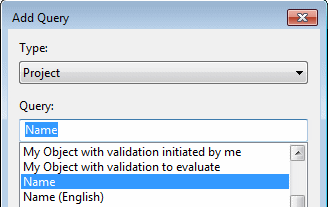
10. To add an object to the range of objects to be generated, click Add and select An Object.
11. In the Add Object dialog box, select the object Type (eg: "Project".
12. In the Name box, select the object (eg: "Customer Loyalty Program") and click OK.
The object appears in the list.
13. Close the Web site properties dialog box.
Creating a Web Site Template from a Web Site
When you have created your Web site, you can save it as a Web site template in order to reuse it.
To create a Web site template from a Web site:
 In the pop-up menu of the Web site, select Manage > Save as Web Site Template.