Customizing a Profile
You can create and customize your own profiles.
 To create and customize your own profiles, see Customizing the characteristics of an existing profile / Creating a profile from an existing profile.
You can customize a profile provided with Hopex:
• modify its available licenses (Command Line attribute)

• modify its status (Profile Status attribute: active/inactive)
• modify its options
• modify its permissions (Set of UI access rights CRUD values)
• modify its associated desktop (Homepage elements: Header, Scope, Quick Access)
Example: customizing the Process Designer profile
To customize Process Designer profile:
1. Access Process Designer profile property pages.
2. Display its Override Configuration page to select the item(s) to override.
3. In the Attributes section, select:
• Command Line
• Profile Options
4. In the Links section, select Overridden for:
• Covered Domain, then click its row and in the Selected Link Details section, select Disabled for "Business process Analysis".
• Homepage, then click its row and in the Selected Link Details section, select Disabled for "Business process Analysis Homepage".
5. Display the Process Designer Characteristics page and define the custom values for the:
• Command Line
• Covered Domain
• Homepage
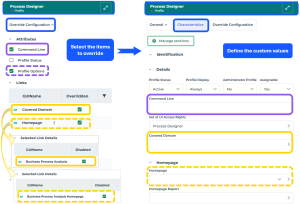
6. Access the Process Designer Options and modify the values concerned.