Using Realization Matrices
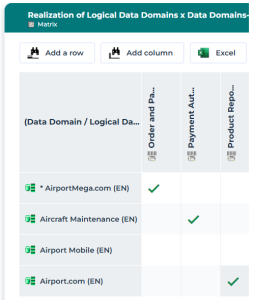
Realization matrices allow you to define and view the realization links between objects in the repository.
Example
Realization of business data by logical data
This matrix is used to specify that logical data (classes, data views, etc.) realize business information (concepts, concept types, etc.).
Realization Levels
 Some of the matrices below are available with Hopex Data Governance only.
Business function level
business data x business data
This matrix is used to specify that business data (concepts, concept types, etc.) realize other business data.Logical level
logical data x logical data
business data x logical data
concept domain map x data domain map
concept domains x logical data domains
logical data domains x application data domains
Physical level
business data x physical data
concept domains x physical data domains
concept domains maps x logical data maps
logical and application data domains x physical data domains
logical data maps x physical data maps
Realization of logical data (classes, data views, etc.) by physical data (tables, table views, etc.) is made through the synchronisation tool. See Synchronizing Logical and Physical Models.Creating a Realization Matrix
To create a realization matrix:
1. Click the Tools > Data Realization navigation menu.
2. In the edit area, select the type of matrix to be created (if there are several) then select New.
The matrix appears in the edit area.
3. Add the data that realizes it in a row and the data realized in a column.
4. To specify that one object realizes another object, click on the cell of the matrix that connects the two objects in question.