Realization of Concepts
Using the “Realization" concept, you can connect logical or physical view elements with dictionary elements.
The realization can be defined on the realized object (concept) or the realizing object (logical or physical data), and extended to the components of the realized and realizing objects.
Note that it is also possible to connect business information with other business information.
Defining the Object that Realizes a Concept
To define the object that realizes a concept:
1. Click the navigation menu, then Glossary > Concepts.
2. Open the properties of the concept of interest.
3. Display the Relationships page and click Realizations.
4. In the Realizer Objects tab, click New.
The business realization creation wizard appears.
5. Specify:
• the object type that realizes (logical or physical data)
• the name of the object concerned
6. Click Add.
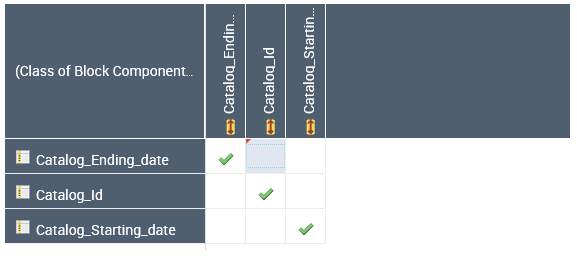
The realizer object appears in the concept properties. When you select this object, a matrix appears in the next section. It displays the components of the object that realizes (the class) in rows and the components of the realized object (the concept) in columns.
From this matrix you can define which components of the class (eg. Attributes) realize which concept components.
From this matrix you can define which components of the class (eg. Attributes) realize which concept components.
Concept realization graph
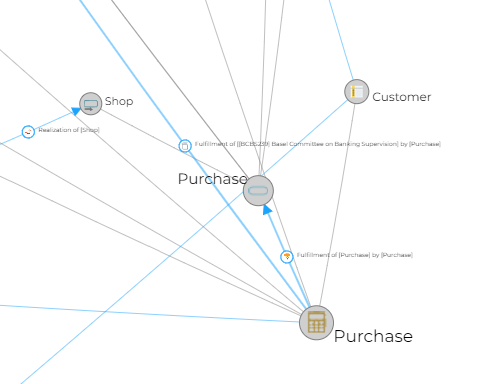
The realization graph lets you visualize which architectural elements are used to implement a concept.
To access this report:
1. Open the properties of the concept.
2. Click the drop-down list then Reporting.
3. In the list of reports, select Architecture > Realization Graph Report.
The example below shows the objects that implement the "Purchase" concept.
Note that realizations of structural components of concepts specified as parameters are also displayed.
Defining the Concept Realized by a Class
To specify the concept realized by a class:
1. Click the Dictionaries > Dictionaries navigation menu.
2. Expand the Data Dictionaries folder.
The list of packages in the repository appears in the edit window.
3. Expand the folder of the package that interests you.
4. Select the class that you want to connect to a concept and open its properties.
5. Display the Relationships page and click Realizations.
6. In the Realized Objects tab, click New.
The Add an Owned Realization dialog box appears.
7. In the Object type field, select "Business information realization" and click Next.
8. Select “Concept”.
9. Reuse or create the concept of interest.
10. Click Add.
The concept appears in the properties of the class. When you select this concept, a matrix appears below the following section. It displays:
• In rows, the components of the realizing object (the class).
• In columns, the components of the realized object (the concept).
11. From this matrix, define which components of the class (for example, attributes) realize which components of the concept.