Configuring Questions
To specify question properties:
 Click the question title.
Its characteristics appear in the right pane of the editor.
You can specify whether:
• the question is visible.
 It may be useful to hide a question and display it only if a condition is met.
• the question is required
For more information on the “Required” symbol, see “Required” symbols.• question delegation is permitted
• the question is in read-only mode (by default, questions of HTML, Image or Expression type are in read-only mode and do not offer this option).
From the question properties you may:
• define execution conditions: see Managing Conditions on Questions
• configure display: see Enriching Questions Visually
Displaying an Indicative Answer
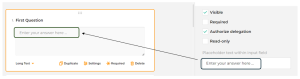
You may enter an indicative answer (a placeholder to pre-fill the answer zone:
Defining a Default Value
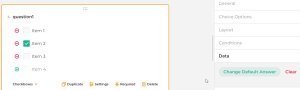
Hopex Enables to define a default value at the question level.
Here, “Item 2” is selected by default when the respondent answers the questionnaire.
 To display a default value depending on particular conditions, see Defining Trigger Actions.