The HOPEX Data Discovery Module
HOPEX Data Discovery deployment in Online mode
The Online mode of HOPEX Data Discovery is available as a module, downloadable from the HOPEX HAS console.
To implement the HOPEX Data Discovery module:
 From your HOPEX version, open the HAS Administration Console and download the "HOPEX Data Discovery" module.
  For more details on importing a module, see "Importing a Module into HOPEX" documentation.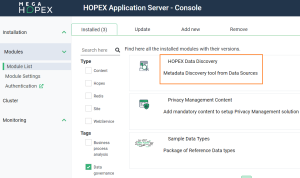
HOPEX Data Discovery deployment in Stand-alone mode
Prerequisite Conditions
The use of HOPEX Data Discovery tool is subject to the following conditions:
• The workstation on which the module is installed in stand-alone mode must have .Net Core 8 and Microsoft Edge WebView2 installed.
• HOPEX Data Discovery in Online mode must also be installed
For more details on Online module installation, see HOPEX Data Discovery deployment in Online mode.For more details on the use of online mode, see Running Import in Stand-alone mode.Stand-alone mode deployment
HOPEX Data Discovery in Stand-alone mode is available as an executable file that is sent to you in a compressed folder (e.g., .zip).
The procedure to deploy HOPEX Data Discovery in Stand-alone mode is as follows:
1. Please contact your account manager MEGA to arrange how to send the compressed file.
2. Unzip the received folder.
After extraction, the folder received should contain the following items.
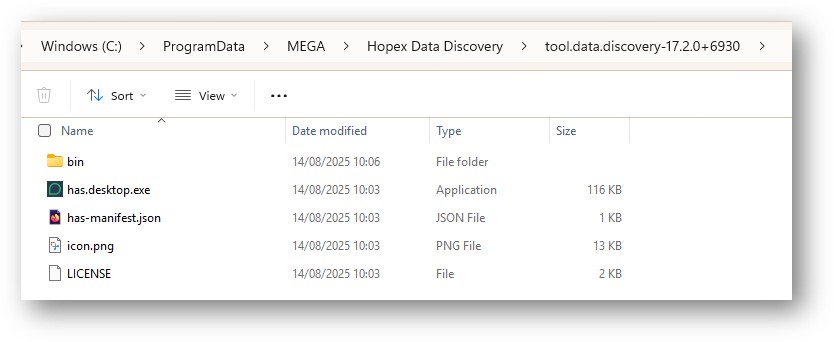 The executable file is "has.desktop.exe". For more details on how to execute it, see HOPEX Data Discovery deployment in Stand-alone mode.
Connection Options to Data Sources
The connection options for each data source are detailed in the Appendix of the Hopex Data Governance Guide See "Appendix - Data Discovery Connectors".