Creating a Delegated Administrator (SaaS)
As a Delegated Administrator, you can create additional Delegated Administrators as needed.
To create an additional Delegated Administrator:
1. Access the HAS Console as a Delegated Administrator.

2. Select Modules > Authentication > User accounts navigation menu.
3. Click Create.
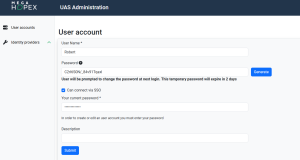
4. In User account, enter the new Delegated Administrator details:
• Login (mandatory): enter the login of the user
• First Name (optional): enter the first name of the user
• Last Name (optional): enter the last name of the user
• Email (optional): enter the email of the user
• Password: enter a temporary password or click Generate.
 The password expires in two days and must be shared with the user for first-time login.
 • (Optional) Select Can connect via SSO to allow login via Single Sign-On.
• (Optional) Add a Description.
5. Click Submit to confirm.