About Web Site Configuration
Web pages are formatted using HTML formatters.
These formatters are of two types:
• HTML descriptors
• script formatters
Level 1: HTML descriptor configuration

Technologies used
• MEGA: HTML descriptors, knowledge of metamodel
• Web: HTML and CSS
Level 2: Script formatters configuration
These are HTML formatters connected to a VB macro.
The HTML formatter is connected on one hand:
• to one or several _Types, depending on pages in which you wish it to appear:
• Object HtmlFormatter (object page formatter)
• Index HtmlFormatter (index page formatter)
• HomePage HtmlFormatter (home page formatter)
• SiteMap HtmlFormatter (site map formatter)
• to a VB macro.
The macro should implement the following method:
Public Sub Generate(oObject, oWebContext, strUserData, strResult)
End Sub
Technologies used
• MEGA: API Script, metamodel knowledge
• Web: HTML, CSS, VB Script
Creating a script formatter
To create a script formatter:
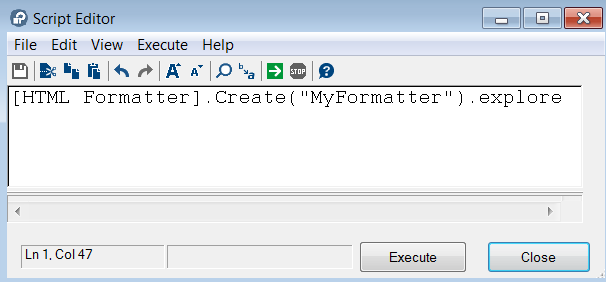
1. From HOPEX menu bar, select Tools > Script Editor.
2. Create an HTML formatter and click Execute  .
.
.
3. In the explorer that appears, access the formatter properties.
4. In the _Type field, connect the formatter to a _Type.
For example: Object HtmlFormatter (an object page formatter).
5. In the Macro field, click the right-oriented arrow and select Create macro.
6. In the Macro field, select Edit.
7. Enter the macro.
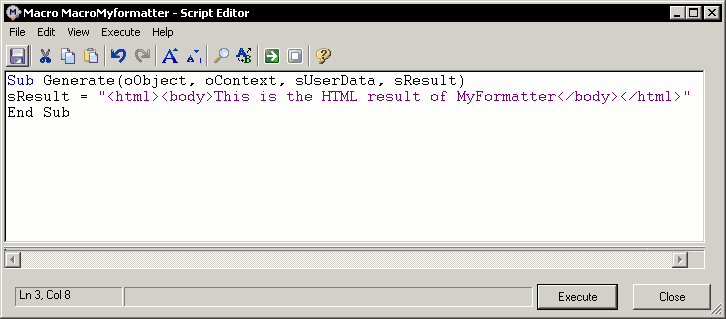
The formatter is now available in formatting fields of Web site pages.