Optimizing HOPEX Usage Saving Calculated MetaAttribute Values
For performance issue, you might want to add a MetaTrigger to a calculated MetaAttribute so as to manage its refresh. With this customization the calculated MetaAttribute value is not recalculated each time the MetaAttribute is displayed, but only when the MetaTrigger is triggered.
MetaTrigger types
MetaTrigger types are the following:
• On Demand
The value is calculated in the following cases:
• if it has never been calculated
• at generation of reports including the object
• on user specific requests in the User Interface
• with a scheduled job
• On Update, On Update with internal Set and On Notify
 On Update and On Notify MetaTrigger types are restricted to MEGA internal use only.
Adding a MetaTrigger to a calculated MetaAttribute
To manage the calculated MetaAttribute refresh, you need to add a MetaTrigger to the MetaAttribute and activate it.
To add a MetaTrigger to a calculated MetaAttribute:
1. In HOPEX, right-click the MetaAttribute and select Explore.
2. Right-click the MetaTrigger folder (in the Impact Analysis  folders) and select New.
folders) and select New.You need to display the Empty Collections  folders.If the MetaTrigger is already created, click Connect.
3. Enter a Name and click OK.
4. Access the MetaTrigger Properties, Characteristics tab:
• in the MetaTrigger Type field, select its type.
Example: On Demand.
• in the MetaTrigger Status field, select "Active".
Limitations
You cannot use On Demand MetaTriggers if the MetaAttribute value can be set by the user and the MetaAttribute calculation is based on the MetaAttribute value presence to be triggered or not.
Use case: Updating a calculated MetaAttribute On Demand
Context
"Cost per user" is a calculated MetaAttribute of the Application MetaClass. For performance issue, you do not need to display its updated value at list display.
For example: in HOPEX IT Portfolio Management (with Application Portfolio Manager profile), in the Home page, when the user click the Applications tile.
Objective
The "Cost per User" values of applications will be refreshed only on user demand.
Configuring the calculated MetaAttribute
To add an On Demand MetaTrigger to the "Cost per user" calculated MetaAttribute:
1. In HOPEX, explore the "Application" MetaClass.
2. In the MetaAttribute folder, expand the "Cost per user" MetaAttribute.
3. Display the Empty Collections folders.
folders.4. In the Impact Analysis folders, right-click its MetaTrigger folder and select New.
folders, right-click its MetaTrigger folder and select New.5. In the Name field enter its name.
E.g.: "CostPerUser"
6. Click OK.
The MetaTrigger is added to the "Cost per User" calculated MetaAttribute.
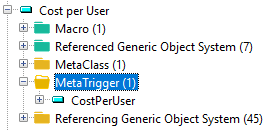
7. Right-click the "CostPerUser" MetaTrigger and select Properties.
8. In the Characteristics tab:
• in the MetaTrigger Type field, select "On Demand".
• in the MetaTrigger Status field, select "Active".
9. Access a list of applications.
For example, connect to HOPEX IT Portfolio Management (with Application Portfolio Manager profile).
In the Cost per User header, a  indicates that this MetaAttribute is updated on Demand and this column values might not be updated.
indicates that this MetaAttribute is updated on Demand and this column values might not be updated.In this case the "Cost per user" values of "Billing" and "Carrier Management" Applications are not up-to-date.
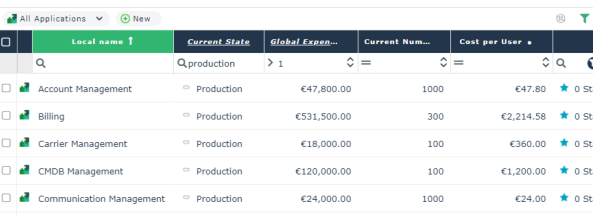
10. Click Synchronize column  to refresh all the "Cost per user" values.
to refresh all the "Cost per user" values.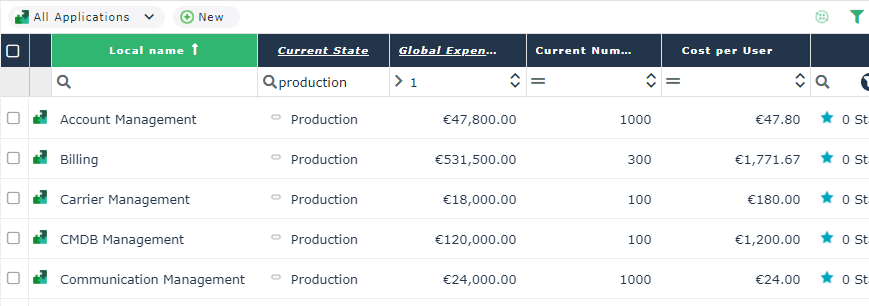
All the calculated MetaAttribute values are recalculated and updated.
In this case the "Cost per user" values of "Billing" and "Carrier Management" Applications are now up-to-date.
If in the list, other calculated MetaAttribute values are also configured On Demand they are also updated.
The  turns to green to indicate that the columns are all synchronized.
turns to green to indicate that the columns are all synchronized.