Regulations
A regulation enables classification of rules according to a specific context or domain.
It can contain not only a set of rules but also sub-regulations.
Displaying regulations
To view regulations provided in HOPEX:
1. Select the MetaStudio navigation window.
 This window is available only with the HOPEX Power Supervisor technical module.
2. Successively expand the "Repository Consistency" and "Modeling Regulation" folders.
The list of available regulations appears.
Activating a regulation
To activate a regulation:
1. In HOPEX menu bar, select Tools > Options.
2. In the dialog box that appears, select Workspace > Modeling and Methods Regulations.
3. In the Active modeling regulation field, click  .
.
.4. In the dialog box that opens, select the regulation to be applied and click OK.
If you have applied several regulations, you must assemble these under a single complex regulation.
Creating a complex regulation
To create a complex regulation:
1. In the MetaStudio navigation window, expand the "Repository Consistency" folder.
2. Right-click the Modeling Regulation folder and select New > Modeling Regulation.
3. Name the new regulation and click OK.
This then appears in the navigator.
4. Drag-and-drop the desired regulations onto this regulation.
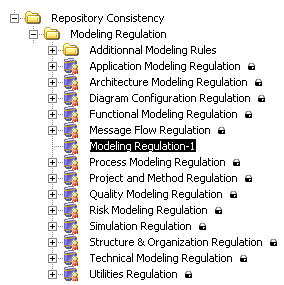
5. To take this new regulation into account, select it in the options dialog box as indicated above.
Defining rules of a regulation
Rules provided by default are accessible in the MetaStudio navigation window. You can view them as a function of the regulations or objects to which they apply. You can also display all existing rules. They are preceded by the following icon:  .
.
.When you run a check on an object, you do this via a regulation. So that a rule can be taken into account in the check, it must be connected to the applied regulation.
To connect a rule to a regulation:
1. Expand the Repository Consistency folder.
2. Find the desired rule in the set of rules or from the objects to which it applies.
3. Select the rule and drag it onto the regulation to which you wish to connect it.
Regulation application scope
Regulation application scope corresponds to the MetaClasses concerned by the regulation. Defining MetaClasses for each regulation simplifies selection of regulations to be applied on an object. In fact, when you run a check on an object, only the list of regulations that concern the object will appear.
You can extend application scope of a regulation.
You can for example connect the "Organizational Process" MetaClass to a regulation concerning operations so that this regulation can apply to operations contained in an organizational process.
To add a MetaClass to regulation application scope :
1. In the MetaStudio navigation window, select the regulation.
2. Open its properties.
3. Select the Scope of Application tab.
The first frame lists the MetaClasses concerned.
4. In the second frame, click the Connect button  .
.
.The Query dialog box appears.
5. Select the MetaClass to be connected, for example "Organizational Process" and click OK.