Renderer implementation
Interface to implement
Renderers must implement the com.mega.modeling.analysis.ViewRenderer interface. This requires the implementation of a single Generate function.
This results in the following structure:
public class MyHTMLRenderer implements ViewRenderer {
@Override
public boolean Generate(final Object document, final ReportContent reportContent, final Item i, final MegaCOMObject megaContext, final Object userData, final MegaRoot root) {
…
}
}
The aim of the function is to append the document object with the rendering of Item i, using the data contained in the ReportContent object.
In this situation, the Item is usually the View object created by the analysis report to link a dataset to this renderer.
In the case of HTML, the document object is a StringBuffer.
In the case of PDF, the document object is an aspose.pdf.Pdf.
In the case of PDF, the document object is an aspose.pdf.Pdf.
A Mega Context object, Mega Root and an optional userData are also made available.
This function produces a boolean that indicates:
• True: capable of rendering in this context with the data supplied, and has done so by appending the document object.
• False: not capable of rendering and has not appended the document object. The analysis engine should try to find another suitable renderer.
Implementation example
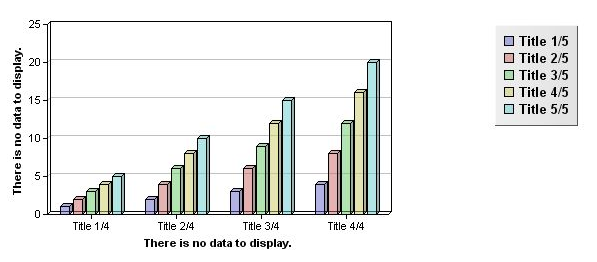
This example uses ChartDirector 4.1, a graph library provided with Mega capable of rendering many different types of charts.
Further documentation on ChartDirector can be obtained from ASE at: http://download2.advsofteng.com/v4/cdjavadoc_html_v4.zip
HTML Renderer Code
import ChartDirector.BarLayer;
import ChartDirector.Chart;
import ChartDirector.LegendBox;
import ChartDirector.XYChart;
import com.mega.modeling.analysis.AnalysisRenderingToolbox;
import com.mega.modeling.analysis.ViewRenderer;
import com.mega.modeling.analysis.content.Dataset;
import com.mega.modeling.analysis.content.Dimension;
import com.mega.modeling.analysis.content.Item;
import com.mega.modeling.analysis.content.ReportContent;
import com.mega.modeling.analysis.content.Value;
import com.mega.modeling.analysis.content.View;
import com.mega.modeling.api.MegaCOMObject;
import com.mega.modeling.api.MegaRoot;
/**
* Renderer for bar chart in HTML
* Accepted dimensionalities: 2
* @author NLE
*/
public class barchartHTMLRenderer implements ViewRenderer {
@Override
public boolean Generate(final Object document, final ReportContent reportContent, final Item i, final MegaCOMObject megaContext, final Object userData, final MegaRoot root) {
if (i instanceof View) {
final Dataset d = reportContent.getDataset(((View) i).getDatasetId());
if (d.getDimensionCount() == 2) {
AnalysisRenderingToolbox.setChartDirectorLicense(root);
// The data for the chart
final Dimension dim1 = d.getDimension(0);
final Dimension dim2 = d.getDimension(1);
// The labels & data for the chart
final int labelCount = dim1.getItemCount();
final int areaCount = dim2.getItemCount();
final String[] labels = new String[labelCount];
for (int ii = 0; ii < labelCount; ii++) {
labels[ii] = AnalysisRenderingToolbox.getItemText(dim1.getItem(ii), root);
}
// Create a XYChart object of size 400 x 240 pixels
final XYChart c = new XYChart(600, 260);
// Add a title to the y-axis
c.yAxis().setTitle(AnalysisRenderingToolbox.getCodeTemplate(dim2.getCodeTemplateID(), root));
// Add a title to the x-axis
c.xAxis().setTitle(AnalysisRenderingToolbox.getCodeTemplate(dim1.getCodeTemplateID(), root));
// Set the x axis labels
c.xAxis().setLabels(labels);
// Set the plot area and size.
c.setPlotArea(40, 30, 340, 190);
// Add a legend box at top right corner using 10 pts Arial Bold
// font. Set the background to silver, with 1 pixel 3D border effect.
final LegendBox b = c.addLegend(570, 30, true, "Arial Bold", 10);
b.setAlignment(Chart.TopRight);
b.setBackground(Chart.silverColor(), Chart.Transparent, 1);
//colors
String sColors = ((View) i).getParameter("colors");
String[] tColors = null;
if ((sColors != null) && (sColors.length() > 1)) {
tColors = sColors.split(",");
}
// Add a multi-bar layer with data sets and 3 pixels 3D depth
final BarLayer layer = c.addBarLayer2(Chart.Side, 3);
for (int j = 0; j < areaCount; j++) {
final double[] data = new double[labelCount];
for (int ii = 0; ii < labelCount; ii++) {
final Item curItem = d.getItem((ii + 1) + "," + (j + 1));
if (curItem instanceof Value) {
data[ii] = (Double) ((Value) curItem).getValue();
} else {
data[ii] = 0.0;
}
}
if (tColors != null) {
layer.addDataSet(data, (int) Long.parseLong(tColors[j], 16), AnalysisRenderingToolbox.getItemText(dim2.getItem(j), root));
} else {
layer.addDataSet(data, AnalysisRenderingToolbox.getHexaColor(j), AnalysisRenderingToolbox.getItemText(dim2.getItem(j), root));
}
}
// Get filename
final String imgurl = root.currentEnvironment().toolkit().getStringFromID(root.currentEnvironment().toolkit().generateID()) + ".jpg";
// Generate chart
c.makeChart(AnalysisRenderingToolbox.getGenerationFolderWrite(megaContext, root) + imgurl);
// append html
AnalysisRenderingToolbox.getShowHideStart(root, (StringBuffer) document, (View) i, d, megaContext);
((StringBuffer) document).append("<p><img src=\"" + AnalysisRenderingToolbox.getGenerationFolderRead(megaContext, root, imgurl) + "\"/></p>");
AnalysisRenderingToolbox.getShowHideEnd((StringBuffer) document, (View) i);
return true;
}
return false;
}
return false;
}
}
PDF Renderer Code
import java.io.File;
import ChartDirector.BarLayer;
import ChartDirector.Chart;
import ChartDirector.LegendBox;
import ChartDirector.XYChart;
import aspose.pdf.Image;
import aspose.pdf.Pdf;
import aspose.pdf.Section;
import com.mega.modeling.analysis.AnalysisRenderingToolbox;
import com.mega.modeling.analysis.ViewRenderer;
import com.mega.modeling.analysis.content.Dataset;
import com.mega.modeling.analysis.content.Dimension;
import com.mega.modeling.analysis.content.Item;
import com.mega.modeling.analysis.content.ReportContent;
import com.mega.modeling.analysis.content.Value;
import com.mega.modeling.analysis.content.View;
import com.mega.modeling.api.MegaCOMObject;
import com.mega.modeling.api.MegaRoot;
/**
* Renderer for bar chart in PDF
* Accepted dimensionalities: 2
* @author NLE
*/
public class barchartPDFRenderer implements ViewRenderer {
@Override
public boolean Generate(final Object document, final ReportContent reportContent, final Item i, final MegaCOMObject megaContext, final Object userData, final MegaRoot root) {
if (i instanceof View) {
final Dataset d = reportContent.getDataset(((View) i).getDatasetId());
if (d.getDimensionCount() == 2) {
AnalysisRenderingToolbox.setChartDirectorLicense(root);
// The data for the chart
final Dimension dim1 = d.getDimension(0);
final Dimension dim2 = d.getDimension(1);
// The labels & data for the chart
final int labelCount = dim1.getItemCount();
final int areaCount = dim2.getItemCount();
final String[] labels = new String[labelCount];
for (int ii = 0; ii < labelCount; ii++) {
labels[ii] = AnalysisRenderingToolbox.getItemText(dim1.getItem(ii), root);
}
// Create a XYChart object of size 400 x 240 pixels
final XYChart c = new XYChart(600, 260);
// Add a title to the y-axis
c.yAxis().setTitle(AnalysisRenderingToolbox.getCodeTemplate(dim2.getCodeTemplateID(), root));
// Add a title to the x-axis
c.xAxis().setTitle(AnalysisRenderingToolbox.getCodeTemplate(dim1.getCodeTemplateID(), root));
// Set the x axis labels
c.xAxis().setLabels(labels);
// Set the plot area and size.
c.setPlotArea(40, 30, 340, 190);
// Add a legend box at top right corner using 10 pts Arial Bold
// font. Set the background to silver, with 1 pixel 3D border effect.
final LegendBox b = c.addLegend(570, 30, true, "Arial Bold", 10);
b.setAlignment(Chart.TopRight);
b.setBackground(Chart.silverColor(), Chart.Transparent, 1);
//colors
String sColors = ((View) i).getParameter("colors");
String[] tColors = null;
if ((sColors != null) && (sColors.length() > 1)) {
tColors = sColors.split(",");
}
// Add a multi-bar layer with data sets and 3 pixels 3D depth
final BarLayer layer = c.addBarLayer2(Chart.Side, 3);
for (int j = 0; j < areaCount; j++) {
final double[] data = new double[labelCount];
for (int ii = 0; ii < labelCount; ii++) {
final Item curItem = d.getItem((ii + 1) + "," + (j + 1));
if (curItem instanceof Value) {
data[ii] = (Double) ((Value) curItem).getValue();
} else {
data[ii] = 0.0;
}
}
if (tColors != null) {
layer.addDataSet(data, (int) Long.parseLong(tColors[j], 16), AnalysisRenderingToolbox.getItemText(dim2.getItem(j), root));
} else {
layer.addDataSet(data, AnalysisRenderingToolbox.getHexaColor(j), AnalysisRenderingToolbox.getItemText(dim2.getItem(j), root));
}
}
// Get filename
final String imgurl = root.currentEnvironment().toolkit().getStringFromID(root.currentEnvironment().toolkit().generateID()) + ".jpg";
// Generate chart
File f = new File(AnalysisRenderingToolbox.getGenerationFolderWrite(megaContext, root) + imgurl);
f.deleteOnExit();
c.makeChart(f.getAbsolutePath());
// append PDF
Section sec1 = ((Pdf) document).getSections().add();
sec1.setIsNewPage(false);
//Create an image object in the section
Image img1 = new Image(sec1);
img1.getImageInfo().setTitle(AnalysisRenderingToolbox.getCodeTemplate(d.getCodeTemplateID(), root));
img1.getImageInfo().setFixWidth(400.0f);
//Add image object into the Paragraphs collection of the section
sec1.getParagraphs().add(img1);
//Set the path of image file
img1.getImageInfo().setFile(f.getAbsolutePath());
return true;
}
return false;
}
return false;
}
}
Example result