Creating a Report DataSet Definition
You can create a Report DataSet Definition populated by:
• occurrences
• a query
Defining a Report DataSet populated by occurrences
 For a detailed use case, see Collecting a Set of Objects, Linked Objects and some of their Properties.
To define a Report DataSet populated by occurrences:
1. Access the Report DataSet Definition folder
2. Right-click the Report DataSet Definition folder and select New > Report DataSet Definition.
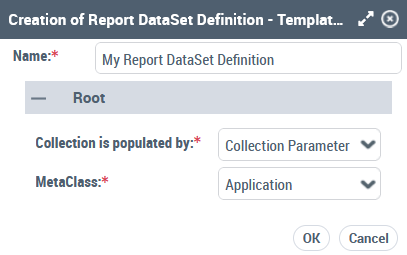
The Creation of Report DataSet Definition window appears
3. In the Name field, enter your Report DataSet Definition name.
By default, the Report DataSet Definition name is: Report DataSet Definition-x (x is a number).4. Define the Root section:
• in the Collection is populated by field keep "Collection Parameter".
• In the MetaClass field, click the arrow and in the drop-down menu select the MetaClass you want to define as the root MetaClass of your Report DataSet Definition.
 In the field, enter the first letters of the MetaClass for a quick access.
Example: Application.
5. Click OK.
Your Report DataSet Definition is created and added to the Report DataSet Definition folder.
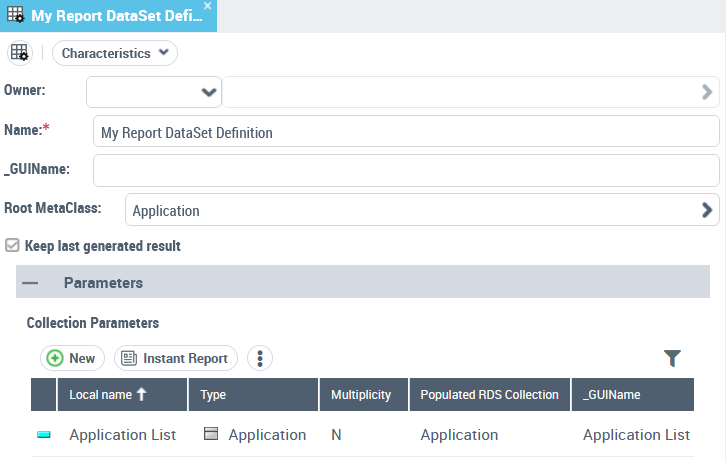
6. In your Report DataSet Definition properties, display its Characteristics page.
It shows:
• the Root MetaClass
Example: Application
• the Collection Parameter characteristics.
For example, with "Application" as root MetaClass, the Collection parameter characteristics are:
- Type: "Application" MetaClass
- Multiplicity: "N", as several applications need to be collected.
- Populated RDS Collection: "Application", i.e. this Collection parameter populates the root node of "My Report DataSet Definition" Report DataSet Definition.
- _GUIName: "Application List", this parameter is displayed in the Report DataSet Definition Preview page.
• the Keep last generated result option: selected by default so that at next session, the first Report DataSet display time is shorten.
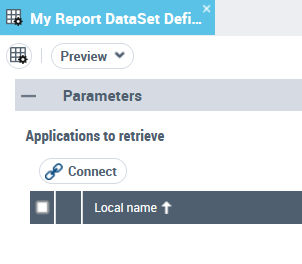
7. (If needed) In the Collection Parameters table, _GUIName field, modify the GUI name for the Collection Parameter.
This parameter is displayed in the Report DataSet Definition Preview page.
E.g.: "Applications to retrieve”
8. In your Report DataSet Definition properties, display its Definition page.
The right pane displays the root Collection of the Report DataSet Definition structure.
Example: "My Report DataSet Definition" Report DataSet Structure  includes the "Application" Report DataSet root Collection
  .
.
includes the "Application" Report DataSet root Collection .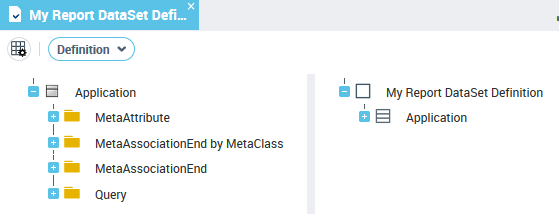
9. Define your Report DataSet Definition structure.
10. (Optional) You can add parameters to filter the data extraction.
11. Display the Report DataSet Definition Preview page.
Defining a Report DataSet populated by a query
For a detailed use case, see Collecting a Set of Objects Using a Query and Adding a Computed Property.To define a Report DataSet populated by a query:
1. Access the Report DataSet Definition folder
2. Right-click the Report DataSet Definition folder and select New > Report DataSet Definition.
The Creation of Report DataSet Definition window appears
3. In the Name field, enter your Report DataSet Definition name.
By default the Report DataSet Definition name is: Report DataSet Definition-x (x is a number).4. Define the Root section:
• in the Collection is populated by field select "Query".
• In the MetaClass field, click the arrow and in the drop-down menu select the MetaClass you want to define as the root MetaClass of your Report DataSet Definition.
In the field, enter the first letters of the MetaClass for a quick access.E.g: Software Technology.
• In the Populating Query field, click the arrow and in the drop-down menu select the query used to retrieve the input data.
The queries listed are related to the MetaClass chosen as root MetaClass.E.g: "APM-Get Technologies from Applications".
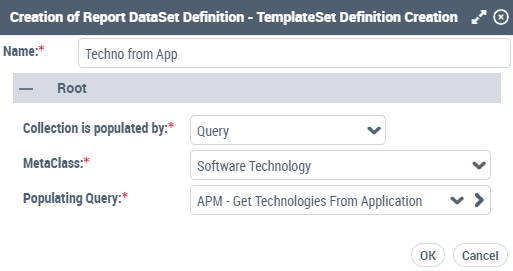
5. Click OK.
Your Report DataSet Definition is created and added to the Report DataSet Definition folder.
6. In your Report DataSet Definition properties, display its Characteristics page.
It shows:
• the Root MetaClass
Example: Software Technology
• the Root Populating Query selected to retrieve the objects:
- Name: "APM-Get Technologies From Application" query retrieves the Software Technologies used in an application
- Query Parameter Name: "Application"
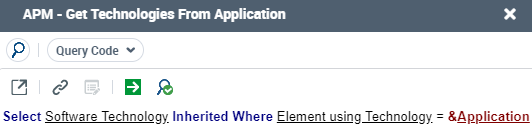
• the Property Parameter (automatically created).
For example, the "APM-Get Technologies From Application" query uses the "Application" Query Parameter to retrieve the Software Technologies:
- Name: "Application"
- Type: "Object" MetaClass
- Referenced MetaClass: "Element Using Technology"
- Query Parameter Name: "Application", this parameter is the exact name used in the query.
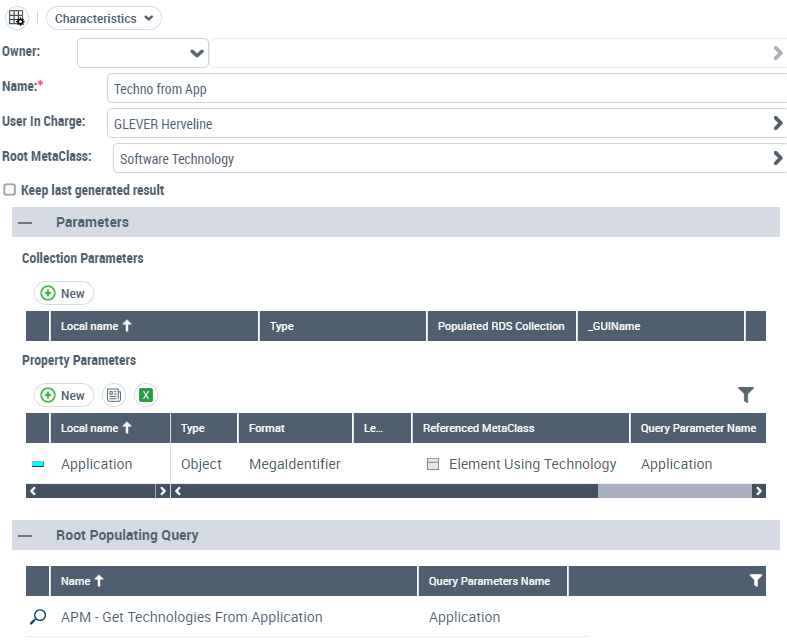
7. In your Report DataSet Definition properties, display its Definition page.
The right pane displays the root collection of the Report DataSet Definition tree structure.
Example: "Techno from App" Report DataSet Structure is created with its "Software technology" Report DataSet root Collection .
is created with its "Software technology" Report DataSet root Collection .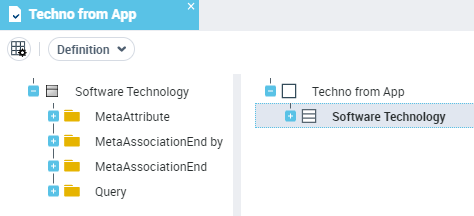
8. Define your Report DataSet Definition structure.
9. (Optional) You can add parameters to filter the data extraction.
10. Display the Report DataSet Definition Preview page.