Accessing the Report DataSet Definitions
You can access :
• all the Report DataSet Definitions
• the custom Report DataSet Definitions only
Custom Report DataSet Definitions are the Report DataSet Definitions not provided by MEGA.
Accessing the Report DataSet Definitions in HOPEX (Web Front-End)
To access the Report DataSet Definitions:
1. Connect to HOPEX Studio desktop.
2. Click the navigation menu and select Report Studio > Report DataSet Definition  .
.
.In the Edit area, the Browse  view displays the Report DataSet Definition tree.
view displays the Report DataSet Definition tree.3. Expand the Report DataSet Definition folder.
All the Report DataSet Definitions available are accessible.
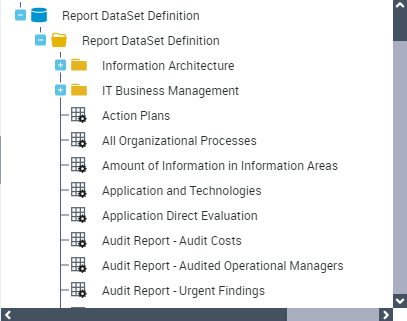
 Click the Report DataSet Definition, to automatically display its properties in the Multi-view window.
Accessing the custom Report DataSet Definitions (Web Front-End)
Custom Report DataSet Definitions are the Report DataSet Definitions not provided by MEGA.
Note that when you customize a Report DataSet Definition provided by MEGA, it becomes a Custom Report DataSet Definition, see How to Modify a Report DataSet Definition Provided by MEGATo access the custom Report DataSet Definitions:
1. Connect to HOPEX Studio desktop.
2. In the Home page, click the Custom Report DataSet Definitions tile.
In the Edit area, the Browse view lists the custom Report DataSet Definitions only.
view lists the custom Report DataSet Definitions only.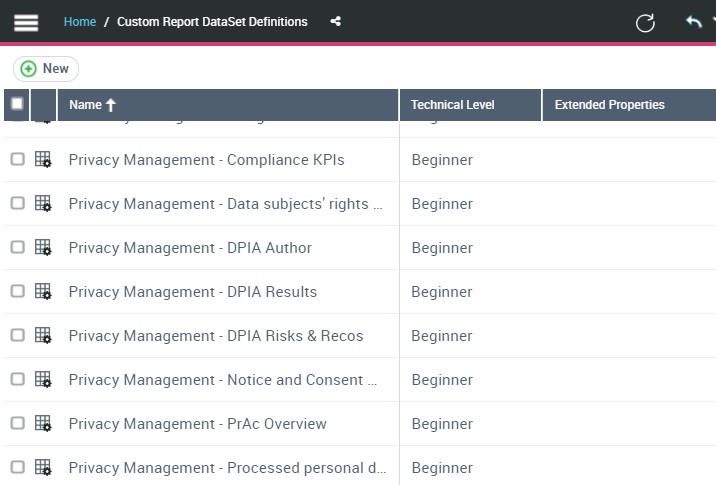
Accessing the Report DataSet Definitions in HOPEX (Windows Front-End)
To access the Report DataSet Definitions:
1. Connect to HOPEX (Windows Front-End) with HOPEX Customizer or HOPEX Customizer Publisher profile.
2. In HOPEX menu bar, select View > Navigation Windows > Utilities.
3. In the repository tree, expand Report DataSet Definition folder.
All the Report DataSet Definitions available are accessible.
Right-click Report DataSet Definition and select properties to access the Report DataSet Definition properties.