Accessing the GraphSet Definitions
You can access :
• all the GraphSet Definitions
• the custom GraphSet Definitions only
Custom GraphSet Definitions are the GraphSet Definitions not provided by MEGA.
Accessing the GraphSet Definitions
To access the GraphSet Definitions:
1. Connect to HOPEX Studio desktop.
2. Click the navigation menu and select Report Studio > GraphSet Definition  .
.
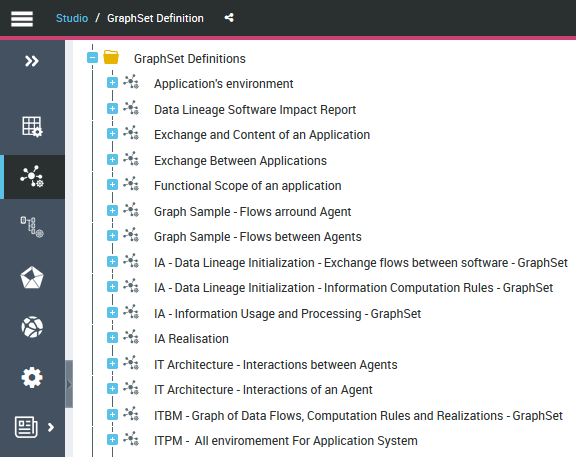
.In the Edit area, the Browse  view displays the GraphSet Definitions tree.
view displays the GraphSet Definitions tree.3. Expand the GraphSet Definitions folder.
All the GraphSet Definitions available are accessible.
Accessing the custom GraphSet Definitions (Web Front-End)
To access the custom GraphSet Definitions:
1. Connect to HOPEX Studio desktop.
2. In the Home page, click the Custom GraphSet Definitions tile.
In the Edit area, the Browse  view lists the custom GraphSet Definitions only.
view lists the custom GraphSet Definitions only.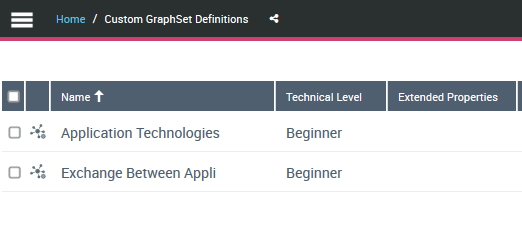
Accessing the GraphSet Definitions from HOPEX (Windows Front-End)
To access the GraphSet Definitions from HOPEX (Windows Front-End):
1. Connect to HOPEX with HOPEX Customizer profile.
2. In HOPEX menu bar, select View > Navigation Windows > Utilities.
3. In the repository tree, expand GraphSet Definition folder.
All the GraphSet Definitions available are accessible.
 Right-click the GraphSet Definition and select Properties to access the GraphSet Definition properties.
Displaying the GraphSet Definition properties
To display the GraphSet Definition properties:
1. Access the GraphSet Definition.
2. Select the GraphSet Definition.
The GraphSet Definition properties are displayed in the Multi-view window.
Displaying the GraphSubSet properties
To display the GraphSubSet properties:
1. Access the GraphSet Definitions.
In the Edit area, the Browse view displays the following folders:
view displays the following folders:• the GraphSet Definitions, which are made up of GraphSubSets
• the GraphSubSets Without Definition, which are GraphSubSets that are not included in any GraphSet Definition.
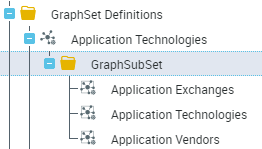
2. Expand the GraphSet Definitions folder, then the GraphSet Definition concerned and its GraphSubSet folder.
The GraphSubSet included in the GraphSet Definition available are accessible.
3. Display the Properties window  .
.
.4. Select the GraphSubSet concerned.
The GraphSubSet properties are displayed in the Properties window.
Displaying the GraphSet arc/node properties
To display the GraphSet arc/node properties:
1. Access the GraphSubSet concerned.
2. Expand the GraphSet Node Definition folder.
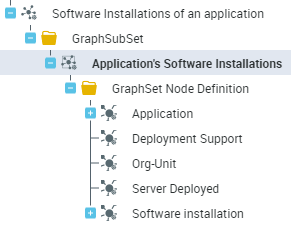
3. Roll the mouse over the node  concerned and in its row click Properties.
concerned and in its row click Properties.Its properties are displayed in the Properties window.
4. Expand a node with a  to access its arc(s).
to access its arc(s).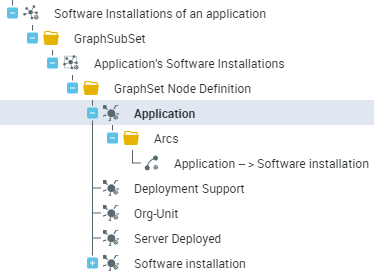
5. Roll the mouse over the arc  concerned and in its row click Properties.
concerned and in its row click Properties.Its properties are displayed in the Properties window.