HOPEX Studio Desktop
The HOPEX Studio desktop includes the standard menus and tools of HOPEX desktops.
 For information regarding HOPEX desktops, see HOPEX Desktop.
HOPEX Studio Navigation Menus
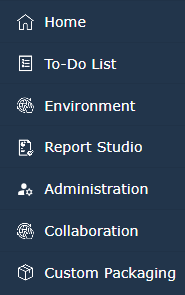
The HOPEX Studio desktop includes the following navigation menus:
• Standard navigation menus:
• To-Do-List
• Environment
• Collaboration
For information regarding use of standard navigation menus, see HOPEX Desktop.• Reporting navigation menus:
• Home, for a quick access to standard tiles as well as to My reports, Custom Report Templates, Custom Report DataSet Definitions, Custom GraphSet Definitions, and Custom TreeSet Definitions tiles, which give access to reports, Report Templates, Report DataSet Definitions, GraphSet Definitions, TreeSet Definition not provided by MEGA.
It can be useful to add the History generic tile to your Home page. • Report Studio: to create Report DataSet Definitions, Report Template Definitions, GraphSet Definitions, TreeSet Definitions and to also create Reports from these definitions.
For information regarding report creation, management and customization, see Generating Documentation.• Administration and customization navigation menus:
• Administration: to manage users (persons, person groups), their profiles and business roles. It also gives access to the scheduling information page.
For information regarding Administration management see Managing Users.• Custom Packaging: to manage customizations
For information regarding customizations, see Modules > HOPEX Application Server Customization.Report Studio Navigation Menus
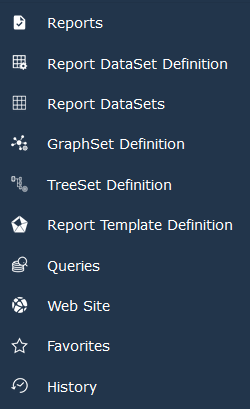
From the Report Studio navigation menu you can especially access, create and customize the Report Studio related definitions:
• Report DataSet Definitions 
• GraphSet Definitions 
See GraphSet Definition.• TreeSet Definition Definitions 
See TreeSet Definition.• Report Template Definitions 
From these definitions you can create and customize:
• Reports
• Report DataSets
• GraphSets
• TreeSets
For information regarding report, Report DataSet, GraphSet, and TreeSet creation, management and customization, see Generating Documentation.The Report Studio navigation menu includes also access to:
 | Reports To access and create reports from Report Templates |
 | Report DataSets To access and create Report DataSets from Report DataSet Definitions |
 | Queries To generate gauge reports and create gauge Report templates |
 | Web Site To generate Web sites |
 | Favorites For a quick access to your favorites and shared favorites |
 | History For a quick access to all of the objects you have accessed |