StdV-1 - Standards Profile
StdV-1 Description
|
Model
|
Description
|
|---|---|
|
StdV-1 - Standards Profile
|
The listing of standards that apply to solution elements.
|
For a more detailed description see the DoDAF web site: StdV-1: Standards Profile.
StdV-1 HOPEX Implementation
The Standards Profile model (StdV-1) provides a list of the technical, operational and business standards that guide and constrain the implementation of systems as defined in the various models of the System Viewpoint.
In HOPEX DoDAF the standard notion encompasses all the technical and non technical items that are recommended by the company for designing the architecture.

Accessing standards
HOPEX DoDAF helps you define standards in a list or in a navigation tree.
To access the list of standards:
1. In the navigation menu click Standards viewpoint > StdV-1 Standards Profile > Standards.
2. Select a standard to open its property page.
You can describe the standard in more detail. See below for more information.
Specifying standard components
A standard can be decomposed into sub-parts. Each part is called a Standard Component.
To specify the components of the standard:
 In the Characteristics page of the standard, specify components in the Owned Standard Components section.
Specifying approving organizations
A standard is approved by an organization.
To specify approvers:
1. From the drop-down menu of the standard property page select the Approval page.
2. Connect approving organizations.
Completing the definition of the standard
Connecting objects of the repository may help provide a more accurate definition of the standard.
To specify the objects which contribute to the definition of the standard:
1. From the drop-down menu of the standard property page select the Defining Items page.
2. Connect the objects which are part of the definition of the standard.
For example, a system can be considered a defining item for a standard.
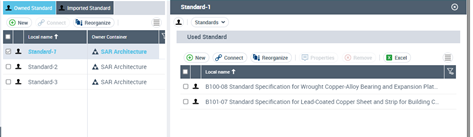
Specifying the standards used
You can specify which standards are used in the standard being defined.
To do so:
1. From the drop-down menu of the standard property page select the Standards page
2. Specify what other standards are used in the standard.