OV-5 Operational Activity Diagram
To create an organizational process diagram:
1. In the navigation menu, click Operational Viewpoint > OV-5b Operational Activity Model > Operational Activities.
2. Right-click an operational activity and select New > Operational Process Diagram.
The diagram is initialized: the current operational activity, represented by a frame, is placed in the diagram.
Defining participants
A participant enables:
• Assignment of a group of operations to one or to several enterprise organizations.
• Representation of a unit external to the operational activity with which the process communicates by means of message flows.
You can create a participant representing:
• an organization
• a system
• an operational activity
• a position type
Creating operational activities
Within the framework of the BPMN notation, you may insert an operational activity directly in another if it is not used elsewhere. In this context, the two operational activities share the same data.
If an operational activity is to be used elsewhere you need to use an operation as an intermediate object. See Calling an operational activity in an operation.
Creating operations
Creating an operation on a participant
To create an operation and connect it to the participant responsible for its execution:
1. Click the Operation button in the insert toolbar and click in the diagram within the frame of the participant concerned.
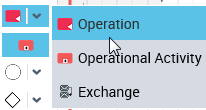
The operation creation dialog box appears.
2. Enter the name of the operation.
3. Click OK.
To assign an operation to another participant:
 Select the operation and move it from one participant to the other.
The frame of the destination participant is highlighted.
 When positioned, the operation is disconnected from the initial participant and reconnected to the new participant executing the operation.
Calling an operational activity in an operation
You can create an operation that calls another operational activity.
You need to follow this procedure when an operational activity needs to be reused by other operational activities. In this case, the two operational activities do not necessarily share the same data.
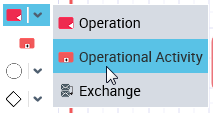
Other object types used in the operational activity diagram
You can also use:
• Events
 Events enable representation of facts occurring during operational activity execution
• Sequence flows between operations
A sequence flow is used to show the order in which steps of an operational activity will be performed. Each sequence flow has only one source and only one target.• Message flows with or without contents
A message flow is information flowing within an enterprise or exchanged between the enterprise and its business environment. A message flow can carry a content.• Data objects
A data object is used to explain how documents, data, and other objects are used and updated during the operational activity. A data object can represent an electronic document, or any other type of object, electronic or physical.• Gateways
To specify that several processing steps are accessible following a particular processing step, you can use a gateway.
Gateways are modeling elements that are used to control how sequence flows interact as they converge and diverge within an operational activity.• Systems Used
• Application system used
• System used
• Service used
• Functionality used
• Resource used